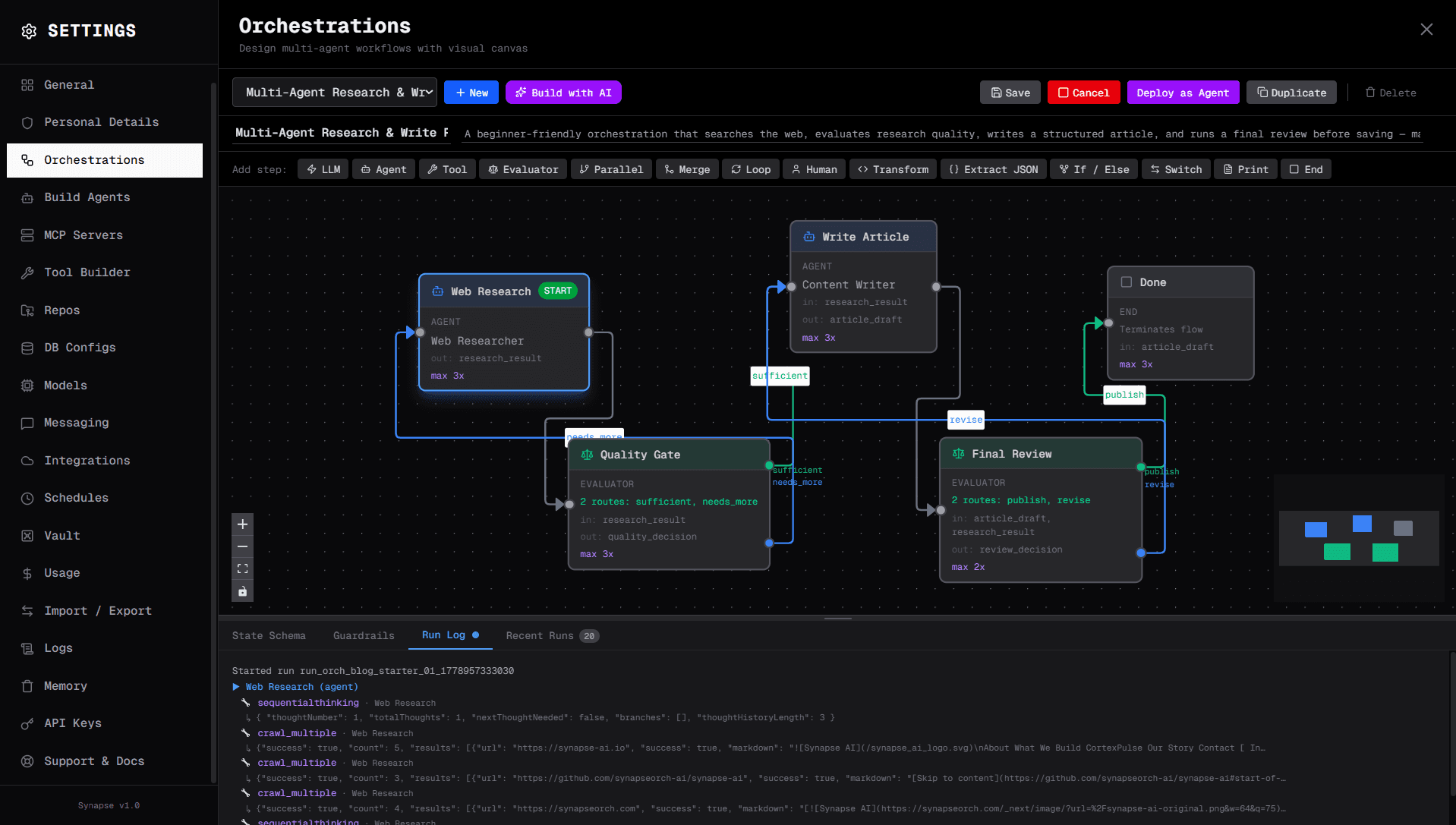
This tutorial walks you through building a real multi-agent workflow from scratch: a pipeline where one agent researches a topic, an evaluator decides whether the research is good enough, a second agent writes an article, and a final evaluator gate approves it for publication — all wired together visually, no code required.
By the end, you'll have a running pipeline and understand the core patterns that power every Synapse workflow.
Prerequisites
- Python 3.11+ or Node.js 22+
- An API key for any supported LLM (Anthropic, OpenAI, or Gemini)
Step 1: Install Synapse AI
macOS / Linux:
curl -sSL https://raw.githubusercontent.com/synapseorch-ai/synapse-ai/main/setup.sh | bashWindows (PowerShell):
irm https://raw.githubusercontent.com/synapseorch-ai/synapse-ai/main/setup.ps1 | iexVia pip or npm:
# pip
pip install synapse-orch-ai

# npm
npm install -g synapse-orch-ai
Run synapse to start the server. The UI opens at http://localhost:3000.
Step 2: Create Two Agents
Before wiring a workflow, you need agents. Go to Agents → New Agent and create two:
Agent 1 — Web Researcher
Give it access to the Web Scraper tools: scrape_url, scrape_structured, crawl_multiple, extract_links, and search_page. Also add vault_write and vault_read so it can save and retrieve findings. Its job is to find credible sources and save findings to the vault.
System prompt (key lines):

Use scraping tools for all factual claims — never recite from memory
for time-sensitive queries. Cite every claim with a source URL.
For each topic, gather at least 3–4 authoritative sources.
Structure output as: Direct Answer → Evidence → Contradictions/Gaps.
Agent 2 — Content Writer
Give it vault access only: vault_write, vault_read, vault_create. It reads research from the vault and produces structured prose.
System prompt (key lines):

Lead with the core point. Use headings to create scannable sections.
Every factual claim must reference the research provided.
Never fabricate statistics or quotes. If a claim can't be verified
from the research, omit it or mark it explicitly as unverified.
Target: 600–1000 words, professional but accessible tone.
Step 3: Wire the Workflow
Open Orchestrations → New Orchestration. You'll see a blank DAG canvas. Add steps in this order:
Step A — Web Research (Agent step)
Drag an Agent step onto the canvas and assign the Web Researcher agent. Set this prompt template:
Research the following topic thoroughly using web search.
Gather at least 4 credible sources and extract:
key facts, statistics, recent developments, and expert perspectives.

Save your findings to the vault and return a structured summary.
The query you enter when running the orchestration becomes the research subject for this step. Set output_key to research_result.
Step B — Quality Gate (Evaluator step)
Add an Evaluator step. This step calls an LLM to inspect research_result and pick a route — no agent needed.
{
  "evaluator_prompt": "Evaluate the research output. Check: (1) Are there at least 3 source URLs cited? (2) Are there concrete facts or statistics? (3) Is the topic scope clear and focused? If all three pass, choose 'sufficient'. Otherwise choose 'needs_more'.",
  "route_map": {
    "sufficient": "step_write_article",
    "needs_more":  "step_research"
  }
}
The needs_more route loops back to the research step. This is automatic retry — one edge on the canvas, zero code.
Step C — Write Article (Agent step)
Add another Agent step, assign the Content Writer. Prompt:
Using the research findings below, write a complete, well-structured article.

Requirements:
- 600–1000 words
- Engaging introduction
- 3 clearly-headed body sections with supporting data
- Actionable conclusion
- Professional but accessible tone

Research:
{{research_result}}

Return the full article text.
input_keys: ["research_result"], output_key: "article_draft".
Step D — Final Review (Evaluator step)
Another Evaluator step checks the draft before it's accepted:
{
  "evaluator_prompt": "Review the article draft. Check: (1) Logical flow and clear structure? (2) Data and sources integrated naturally? (3) Length 600–1000 words? (4) Strong conclusion? If all pass, choose 'publish'. Otherwise choose 'revise'.",
  "route_map": {
    "publish": "step_end",
    "revise":  "step_write_article"
  }
}
Set max_iterations: 2 to cap revision loops.
Step E — End
Add an End step. Connect the publish route of the Final Review to it.
Step 4: The Complete Graph
Five steps, two agents, two quality gates. The dashed edges are automatic retry loops — if research is thin, the evaluator sends it back; if the draft is weak, it goes back to the writer. No extra code.
Step 5: Run It
There are two ways to run this pipeline.
Option A — Run from the canvas
Open the orchestration, click Run in the top toolbar. Type your query in the input field and hit Execute — for example, "retrieval-augmented generation". The steps light up in sequence as they execute; you can watch the Web Research agent fire searches in real time, see the Quality Gate route the result, and track the article draft being written — all on the canvas.
Option B — Deploy as a conversational agent
This is the more powerful path for ongoing use. Open the orchestration on the canvas and click the Deploy as Agent button — this wraps the orchestration as a chat agent instantly.
Open the chat window, select the deployed agent, and just talk to it:
"Research the impact of LLMs on software education and write an article about it"
The agent parses your message, extracts the topic, kicks off the full pipeline, and streams the result back into the conversation — no manual input panel required. This is the best way to embed the pipeline into a larger workflow or share it with teammates who don't need to touch the canvas.
Step 6: Import the Ready-Made Version
Don't want to build it by hand? Download the orchestration at the bottom of this page and import it directly into Synapse. It includes both agents with full system prompts, all five steps with prompt templates pre-filled, and the evaluator routes already wired.
What's Next
Once this pipeline is running, extending it takes minutes on the canvas:
- Add a Human step between Final Review and Done — pauses execution and routes the draft to Slack or Discord for a human sign-off before publishing
- Swap models per step — use
claude-haiku-4-5for the Quality Gate (cheap routing call) andclaude-opus-4-7for Write Article (higher quality output) - Add scheduling — set
trigger: "schedule"with a cron expression to run the pipeline every morning on a rotating topic list
The DAG canvas makes these changes drag-and-drop. No redeployment.
Check the docs for the full step type reference, or join the Discord if you get stuck.