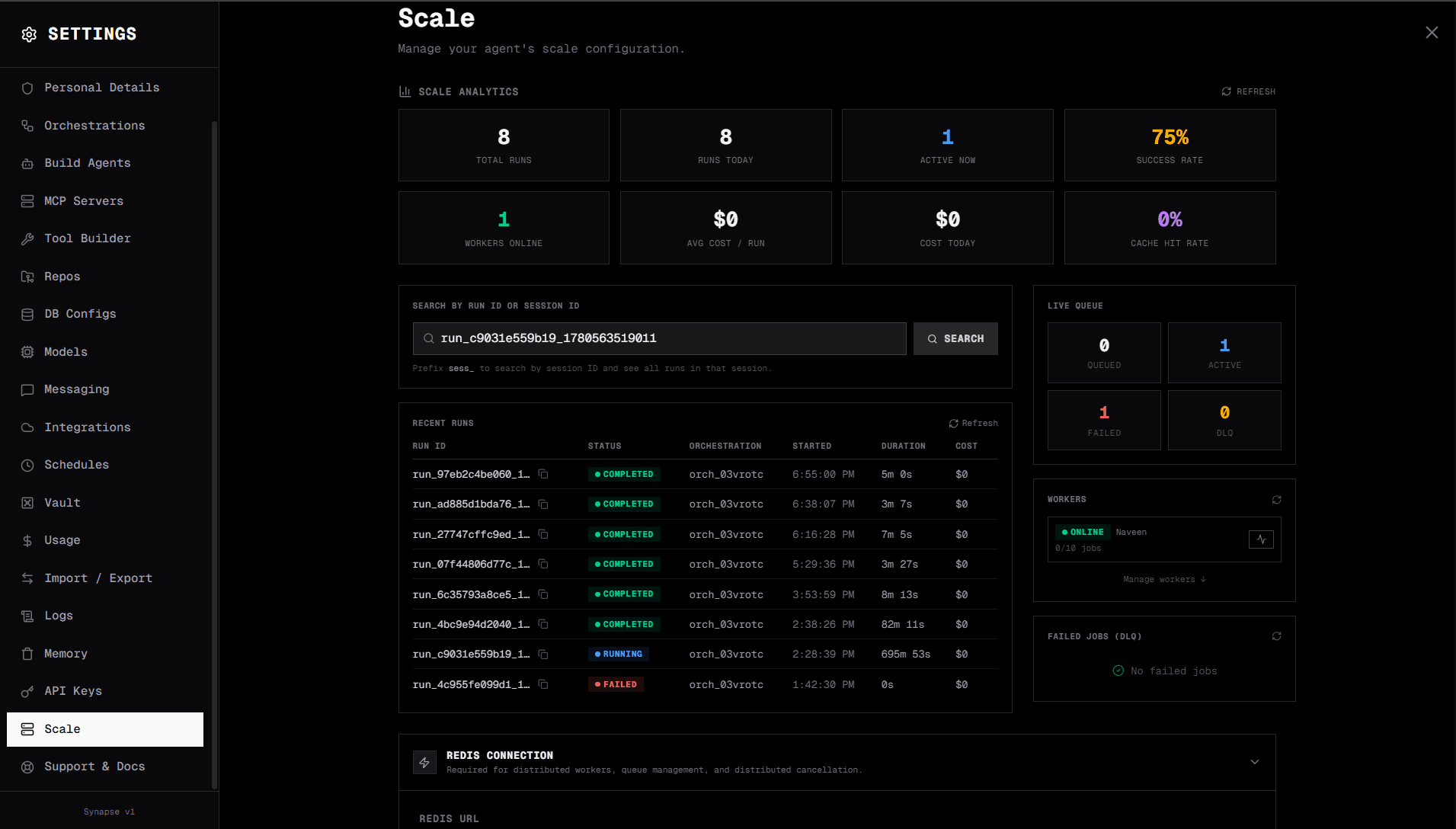
Every AI workflow demo looks great at one request per second. The real test is what happens when your internal legal team, your customer portal, and three product teams all hit the same pipeline simultaneously. Does it queue gracefully? Does it report back in real time? Does a single crash take everything down?
This post covers SynapseOrch's distributed scale mode — how it works, what the V2 API looks like to consumers, and how your team can deploy it to handle any volume from a dozen internal users to millions of customer-facing requests per month.
The Problem with Single-Process AI Orchestration
Most open-source AI orchestration tools — including the standalone version of SynapseOrch — execute workflows in the same process that serves the API. This works well in development and for small teams. It breaks down when:
- Multiple long-running workflows compete for the same event loop. A 30-step research pipeline blocks a quick 2-step tool call.
- A crash takes every in-flight job with it. No restart logic, no checkpoint recovery.
- Scaling requires duplicating the entire app. You can't just add more "job runners" independently.
- You need per-tenant resource limits. Giving one team 10 parallel slots and another team 2 requires custom plumbing.
The distributed scale layer solves all of these by separating the concerns: the API server only coordinates, Redis queues and streams events, and independent worker processes execute the actual AI workflows.
Architecture Overview
API servers are stateless. You can run one or fifty behind a load balancer — they never hold job state. All coordination flows through Redis and Postgres.
Workers are the execution layer. Each worker is an independent Python process pulling from Redis and publishing real-time events back. You can run workers on different machines, in Kubernetes pods, or in Docker Compose services.
Redis Cluster plays three roles: ARQ job queue (sorted set), SSE event streams (Redis Streams with XADD/XREAD), and distributed signals (cancellation, human input via simple key/TTL). Running Redis in cluster mode gives you automatic sharding across nodes and failover with no single point of failure — a 3-primary + 3-replica cluster handles millions of enqueue/read operations per day without breaking a sweat.
PgBouncer sits in front of Postgres in transaction pooling mode, multiplexing hundreds of concurrent worker connections into a small, stable connection pool. Without it, 50 workers each holding 3 connections would exhaust Postgres's max_connections under load. With it, you can run hundreds of workers against a standard Postgres instance.
PostgreSQL is the source of truth: full run state with checkpoints after every step, worker registry with heartbeat timestamps, dead-letter queue for failed jobs, and multi-tenant quota tracking.
S3-compatible storage (AWS S3, Cloudflare R2, or self-hosted MinIO) stores large artifacts — file outputs, document attachments, batch result payloads — keeping Postgres lean. Workers stream large outputs directly to S3 and store only a reference key in Postgres.
Enterprise Use Cases
1. Internal AI Operations Platform
A 200-person company uses SynapseOrch to automate their back-office: contract review, onboarding document generation, and customer data enrichment. Each of these is a multi-step orchestration mixing LLM calls with database queries and API calls.
Without scale mode, these jobs block each other. With scale mode:
- Legal team's 40-step contract pipeline doesn't slow down Sales team's 3-step lead enrichment.
- Each department gets a tenant ID with its own quota: Legal gets 10 concurrent runs, Sales gets 5.
- A crashed worker doesn't lose the contract review mid-way — the checkpoint in Postgres lets it resume from the last completed step after a restart.
- The Operations team monitors queue depth and active workers from the Scale settings dashboard.
2. SaaS Product with AI-Powered Features
You're building a B2B SaaS where each customer account can trigger AI workflows — a competitive analysis pipeline, a weekly report generator, or an automated QA suite. You need:
- Per-customer isolation: One customer's 100-step report doesn't starve another customer's 5-step summary.
- Real-time status streaming: Your frontend shows a live activity log as the AI works through each step.
- Programmatic control: Cancel a run if the user navigates away. Retry failed runs. Inspect the dead-letter queue.
- Predictable billing: Count tokens per run from the
total_tokens_usedfield. Reject excess requests with HTTP 429 when a customer's quota is exceeded.
All of this is native to the V2 API. You don't build it — you consume it.
3. Developer Platform / Internal API Gateway
Platform teams increasingly expose AI capabilities as internal APIs that product teams consume. The V2 API is designed for exactly this: it's authenticated, it returns structured status, it supports webhooks, and it streams events over SSE for frontend consumption.
A platform team at a fintech deploys SynapseOrch with 20 workers, configures Redis Cluster for high availability, PgBouncer for connection pooling, and exposes /api/v2/ to internal product teams who integrate it the same way they'd integrate any REST API — no knowledge of how orchestrations work under the hood required.
The V2 API — Developer Guide
The scale layer exposes a versioned REST API at /api/v2/. Everything requires a bearer token (created in Settings → API Keys).
export API_BASE="https://your-synapse.internal:8123"
export TOKEN="sk-syn-your-api-key-here"
Running an Orchestration
Send a POST to enqueue a run. The response is immediate — the job is queued in Redis and a run_id is returned with HTTP 202.
curl -s -X POST "$API_BASE/api/v2/orchestrations/orch_content_pipeline/run" \
  -H "Authorization: Bearer $TOKEN" \
  -H "Content-Type: application/json" \
  -d '{
    "message": "Write a competitive analysis of Redis vs Kafka for our engineering blog",
    "tenant_id": "marketing-team"
  }'
{
"run_id": "run_2483e1773407_1780499750067",
"status": "queued",
"stream_url": "/api/v2/orchestrations/runs/run_2483e1773407_1780499750067/stream",
"status_url": "/api/v2/orchestrations/runs/run_2483e1773407_1780499750067/status"
}The run_id is your handle for everything that follows. The actual work hasn't started yet — a worker will pick it up within milliseconds.
Streaming Real-Time Events (SSE)
Subscribe to the run's event stream. The connection stays open and events arrive as the orchestration executes each step:
curl -N "$API_BASE/api/v2/orchestrations/runs/$RUN_ID/stream" \
  -H "Authorization: Bearer $TOKEN" \
  -H "Accept: text/event-stream"
Events flow in order:
id: 1780499750127-0
data: {"type": "worker_picked_up", "worker_id": "worker-prod-01"}

id: 1780499750218-0
data: {"type": "step_start", "orch_step_id": "step_research", "step_name": "Research Topic", "step_type": "agent"}

id: 1780499750229-0
data: {"type": "tool_execution", "tool_name": "web_search", "args": {"query": "Redis vs Kafka 2026"}}

id: 1780499758250-0
data: {"type": "step_complete", "orch_step_id": "step_research", "duration_seconds": 8.02}

id: 1780499758251-0
data: {"type": "orchestration_complete", "status": "completed", "final_state": {...}}

id: 1780499758258-0
data: {"type": "done"}
The id: field is a Redis Stream entry ID. If your SSE client disconnects and reconnects, pass the last seen ID in the Last-Event-ID header and you'll receive only the missed events:
curl -N "$API_BASE/api/v2/orchestrations/runs/$RUN_ID/stream" \
  -H "Authorization: Bearer $TOKEN" \
  -H "Last-Event-ID: 1780499750229-0"
This makes real-time frontends resilient to brief network interruptions without missing a single step.
Polling Status (Alternative to Streaming)
If your integration doesn't support SSE — a mobile app, a webhook receiver, a cron job — poll the status endpoint:
curl -s "$API_BASE/api/v2/orchestrations/runs/$RUN_ID/status" \
  -H "Authorization: Bearer $TOKEN"
{
"run_id": "run_2483e1773407_1780499750067",
"orchestration_id": "orch_content_pipeline",
"status": "running",
"current_step_id": "step_write",
"waiting_for_human": false,
"worker_id": "worker-prod-01",
"total_cost_usd": 0.047,
"total_tokens_used": 12400,
"started_at": "2026-06-04T09:15:30Z",
"ended_at": null
}Status transitions: queued → running → completed | cancelled | failed
Cancelling a Run
curl -s -X POST "$API_BASE/api/v2/orchestrations/runs/$RUN_ID/cancel" \
  -H "Authorization: Bearer $TOKEN"
The cancellation signal is published to Redis. The executing worker checks it at each step boundary and stops cleanly — the run record in Postgres is updated to status=cancelled. Useful for user-initiated aborts and timeout guards in your own application layer.
Agent Chat via V2 API
The same distributed infrastructure works for multi-turn agent conversations. Each turn is a discrete job — the session history is persisted in Postgres and loaded by whichever worker picks up the next message:
curl -s -X POST "$API_BASE/api/v2/chat" \
  -H "Authorization: Bearer $TOKEN" \
  -H "Content-Type: application/json" \
  -d '{
    "message": "Summarize our Q1 sales data from the database",
    "agent": "data-analyst",
    "session_id": null
  }'
{
"session_id": "sess_b639c740430d4a9a",
"status": "queued",
"stream_url": "/api/v2/chat/sess_b639c740430d4a9a/stream"
}Follow-up turns use the same session_id. History is loaded from Postgres, so any worker can handle any turn — no session affinity required.
Webhook Callbacks
Instead of maintaining an SSE connection, register a webhook URL when enqueueing:
curl -s -X POST "$API_BASE/api/v2/orchestrations/orch_report_generator/run" \
  -H "Authorization: Bearer $TOKEN" \
  -H "Content-Type: application/json" \
  -d '{
    "message": "Generate weekly sales report for EMEA",
    "tenant_id": "finance-team",
    "webhook_url": "https://your-app.internal/webhooks/synapse",
    "webhook_secret": "your-hmac-secret"
  }'
When the run completes (or fails), a signed POST is delivered to your webhook URL with the full run result. The signature is in X-Synapse-Signature as sha256=HMAC(secret, body) — verify it before trusting the payload.
Listing Orchestrations and Agents
# All orchestrations available to run
curl -s "$API_BASE/api/v2/orchestrations" -H "Authorization: Bearer $TOKEN"

# Specific orchestration definition
curl -s "$API_BASE/api/v2/orchestrations/orch_content_pipeline" -H "Authorization: Bearer $TOKEN"

# All registered agents
curl -s "$API_BASE/api/v2/agents" -H "Authorization: Bearer $TOKEN"
These read from Postgres (kept in sync with your local definitions via the Sync operation in Settings → Scale).
Setting Up Scale Mode
Prerequisites
- A running SynapseOrch instance
- Redis 7+ (single node for development, Redis Cluster for production HA)
- PostgreSQL 14+
- PgBouncer 1.18+ (optional but recommended for production)
- S3-compatible storage — AWS S3, Cloudflare R2, or MinIO
Step 1 — Start Redis
For local development, a single Redis node is fine:
docker run -d \
  --name synapse-redis \
  -p 6379:6379 \
  redis:7-alpine \
  redis-server --maxmemory 2gb --maxmemory-policy allkeys-lru
For production, deploy a Redis Cluster (minimum 3 primary + 3 replica nodes). The REDIS_URL format for cluster mode uses redis+cluster:// — configure via the Settings UI once the cluster is running.
Step 2 — Create the Scale Database
psql postgresql://user:pass@localhost:5432/postgres \
  -c "CREATE DATABASE synapse_scale;"
Tables are created automatically when SynapseOrch first connects — no migration scripts needed.
Step 3 — (Optional) Start PgBouncer
For production deployments with multiple workers, run PgBouncer in transaction pooling mode in front of Postgres:
# pgbouncer.ini
[databases]
synapse_scale = host=localhost port=5432 dbname=synapse_scale

[pgbouncer]
pool_mode = transaction
max_client_conn = 1000
default_pool_size = 20
listen_addr = 0.0.0.0
listen_port = 6432
auth_type = md5
Workers connect to PgBouncer on port 6432 instead of Postgres directly. PgBouncer multiplexes those connections into a pool of 20, keeping Postgres healthy under heavy worker load.
Step 4 — Configure via the Settings UI
Open Settings → Scale in the SynapseOrch UI and fill in all credentials — this is the central vault for your scale infrastructure connections:
Database & Queue
- Redis URL:
redis://localhost:6379/0(orredis+cluster://node1:6379,node2:6379for cluster) - Postgres URL:
postgresql://user:pass@localhost:6432/synapse_scale(use PgBouncer port if running it) - Click Test Redis and Test Postgres to verify connectivity
S3 Storage
4. S3 Endpoint: https://s3.amazonaws.com (or your R2/MinIO endpoint)
5. Bucket Name: synapse-artifacts
6. Region: us-east-1 (leave blank for R2/MinIO)
7. Access Key ID and Secret Access Key (leave blank to use an IAM role / instance profile)
8. Click Test S3 to verify bucket access
Save & Sync 9. Click Save 10. Click Sync Now to push your orchestration and agent definitions to Postgres
The sync copies all your existing orchestrations, agents, tools, and settings (including LLM API keys) into Postgres so workers can access them without touching local files.
Step 5 — Start Workers
Workers are independent Python processes. Start as many as you need:
REDIS_URL=redis://localhost:6379/0 \
SCALE_POSTGRES_URL=postgresql://user:pass@localhost:6432/synapse_scale \
WORKER_CONCURRENCY=10 \
WORKER_HEALTH_PORT=9000 \
SYNAPSE_DATA_DIR=/path/to/backend/data \
python worker_main.py
Each worker registers itself in Postgres, sends heartbeats every 30 seconds, and pulls jobs from Redis. Verify a worker is healthy:
curl http://localhost:9000/health{
"status": "ok",
"worker_id": "worker-prod-01",
"active_jobs": 3,
"max_jobs": 10,
"pg_connected": true,
"redis_connected": true,
"s3_connected": true
}The Scale settings dashboard shows all registered workers — their status, active job count, last heartbeat — and lets you ping each one from the UI.
Production Patterns
Horizontal Scaling
Workers share nothing except Redis and Postgres. Add more by running the same command on another machine, or use Docker Compose replicas:
services:
  worker:
    build:
      dockerfile: Dockerfile.worker
    environment:
      - REDIS_URL=redis://synapse-redis:6379/0
      - SCALE_POSTGRES_URL=postgresql://pgbouncer:6432/synapse_scale
      - WORKER_CONCURRENCY=10
    deploy:
      replicas: 4   # 4 workers × 10 concurrent = 40 simultaneous runs
For Kubernetes, KEDA autoscales the worker deployment based on Redis queue depth:
spec:
  triggers:
    - type: redis
      metadata:
        listName: synapse:orchestrations:default
        listLength: "5"   # 1 new replica per 5 queued jobs
  minReplicaCount: 1
  maxReplicaCount: 100
Multi-Tenant Quotas
Create tenants with resource limits per team or customer:
curl -s -X POST http://localhost:8123/scale/tenants \
  -H "Content-Type: application/json" \
  -d '{
    "tenant_id": "acme-corp",
    "name": "ACME Corp",
    "max_concurrent_runs": 20,
    "max_queued_runs": 100
  }'
Start the API server with ENABLE_TENANT_ISOLATION=1. Requests with "tenant_id": "acme-corp" are checked against live quota counts — exceeding max_queued_runs returns HTTP 429 immediately, with no work wasted on the queuing side.
Dead Letter Queue
Jobs that fail after all retries land in the dead-letter queue:
# List failed jobs
curl -s http://localhost:8123/scale/dlq | jq .

# Retry a specific failure
curl -s -X POST "http://localhost:8123/scale/dlq/{dlq-id}/retry"
The DLQ stores the full error traceback, job payload, attempt count, and failure timestamp. The Scale settings UI shows this with an expandable error view and one-click retry.
Stale Worker Detection
Workers that crash hard (SIGKILL, OOM, machine failure) don't run their shutdown hook and stay listed as online. The API server runs a background reaper that marks workers offline if their heartbeat goes silent for more than 90 seconds — 3× the normal 30-second interval. No manual cleanup needed.
Observability
Prometheus metrics at /api/v2/metrics:
synapse_runs_enqueued_total{orch_id, tenant_id}
synapse_runs_completed_total{status, tenant_id}
synapse_run_duration_seconds{tenant_id}     # histogram
synapse_step_duration_seconds{step_type}    # histogram
synapse_queue_depth{queue_name}             # gauge
synapse_active_workers                      # gauge
OpenTelemetry tracing is enabled by setting OTLP_ENDPOINT=http://jaeger:4317. Every HTTP request, database query, and Redis call becomes a traced span — useful for diagnosing latency inside complex multi-step orchestrations.
Queue stats from the API:
curl -s "$API_BASE/api/v2/queue/stats" -H "Authorization: Bearer $TOKEN"{
"queue_name": "synapse:orchestrations:default",
"queued": 12,
"active": 8
}Use queued to decide when to spin up more workers.
What to Expect at Scale
A single worker with WORKER_CONCURRENCY=10 handles 10 simultaneous orchestrations. A typical 5-step pipeline with 3 LLM calls runs in 15–45 seconds wall-clock time.
At 4 workers × 10 concurrent = 40 simultaneous runs, you process roughly 2,000–5,000 orchestration runs per hour depending on LLM response times. The Postgres and Redis overhead is negligible — the bottleneck is always LLM API rate limits.
With a Redis Cluster and PgBouncer in front of Postgres, a 20-worker cluster at 20 concurrency each handles 400 simultaneous runs and processes millions of orchestration runs per month with no single point of failure. Add more workers to the cluster and throughput scales linearly — the queue and database layer do not become the bottleneck.
For bursts above sustained capacity, the queue is your friend. Jobs enqueue instantly (the Redis write takes under 1 ms), the caller gets a 202 immediately, and the backlog drains as fast as workers can pull from it. No requests are dropped.
Integrating V2 into Your Product
The V2 API is designed to be called from application code, not just the SynapseOrch UI.
Python (async):
import httpx, json

BASE = "https://synapse.internal:8123"
TOKEN = "sk-syn-your-token"

async def run_orchestration(orch_id: str, message: str, tenant_id: str) -> str:
    async with httpx.AsyncClient() as client:
        r = await client.post(
            f"{BASE}/api/v2/orchestrations/{orch_id}/run",
            headers={"Authorization": f"Bearer {TOKEN}"},
            json={"message": message, "tenant_id": tenant_id},
        )
        r.raise_for_status()
        return r.json()["run_id"]

async def stream_events(run_id: str):
    async with httpx.AsyncClient() as client:
        async with client.stream(
            "GET",
            f"{BASE}/api/v2/orchestrations/runs/{run_id}/stream",
            headers={"Authorization": f"Bearer {TOKEN}", "Accept": "text/event-stream"},
            timeout=None,
        ) as r:
            async for line in r.aiter_lines():
                if line.startswith("data: "):
                    event = json.loads(line[6:])
                    yield event
                    if event.get("type") == "done":
                        break
TypeScript:
const BASE = "https://synapse.internal:8123";
const TOKEN = "sk-syn-your-token";

async function runOrchestration(orchId: string, message: string, tenantId: string) {
  const res = await fetch(`${BASE}/api/v2/orchestrations/${orchId}/run`, {
    method: "POST",
    headers: { Authorization: `Bearer ${TOKEN}`, "Content-Type": "application/json" },
    body: JSON.stringify({ message, tenant_id: tenantId }),
  });
  const { run_id } = await res.json();
  return run_id;
}

async function* streamEvents(runId: string) {
  const res = await fetch(`${BASE}/api/v2/orchestrations/runs/${runId}/stream`, {
    headers: { Authorization: `Bearer ${TOKEN}` },
  });
  const reader = res.body!.getReader();
  const decoder = new TextDecoder();
  let buffer = "";
  while (true) {
    const { done, value } = await reader.read();
    if (done) break;
    buffer += decoder.decode(value, { stream: true });
    const lines = buffer.split("\n");
    buffer = lines.pop()!;
    for (const line of lines) {
      if (line.startsWith("data: ")) {
        const event = JSON.parse(line.slice(6));
        yield event;
        if (event.type === "done") return;
      }
    }
  }
}
React hook for a live step-by-step activity feed in your product:
function useOrchestrationRun(runId: string | null) {
  const [events, setEvents] = useState<any[]>([]);
  const [status, setStatus] = useState<"idle" | "running" | "done">("idle");

  useEffect(() => {
    if (!runId) return;
    setStatus("running");
    const es = new EventSource(
      `${BASE}/api/v2/orchestrations/runs/${runId}/stream?token=${TOKEN}`
    );
    es.onmessage = (e) => {
      const event = JSON.parse(e.data);
      setEvents((prev) => [...prev, event]);
      if (event.type === "done") {
        setStatus("done");
        es.close();
      }
    };
    return () => es.close();
  }, [runId]);

  return { events, status };
}
Summary
The scale layer turns SynapseOrch from a single-user local tool into a production platform capable of handling millions of runs per month:
| Capability | Standalone Mode | Scale Mode |
|---|---|---|
| Concurrent runs | 1 (event-loop bound) | Unlimited (workers × concurrency) |
| Run state storage | JSON files | PostgreSQL with per-step checkpoints |
| Real-time events | In-process SSE | Redis Streams (reconnect-safe) |
| Cancellation | In-memory flag | Distributed Redis key |
| Multi-tenancy | — | Quotas + per-tenant queues |
| Worker failure recovery | All jobs lost | Jobs re-queued; runs checkpointed |
| Horizontal scaling | Cannot | Add workers independently |
| Observability | Logs only | Prometheus metrics + OTEL traces |
| Dead-letter queue | — | Inspect and retry failed jobs |
| Stale worker cleanup | — | Automatic heartbeat reaper |
| Connection pooling | — | PgBouncer (100s of workers → small pool) |
| Artifact storage | Local filesystem | S3-compatible (AWS S3 · R2 · MinIO) |
| Redis HA | Single node | Redis Cluster (sharding + auto-failover) |
The V2 API is the stable interface your product code builds against. The workers, Redis Cluster, PgBouncer, Postgres, and S3 are the infrastructure you scale behind it.
You can start with a single worker on the same machine as your API server and grow to a Kubernetes cluster with 100 auto-scaling workers as demand increases — without changing a single line of application code that calls the V2 API.
SynapseOrch is open-source under AGPL-3.0. The scale layer is part of the core distribution — no separate enterprise license required.