Picture this: a customer requests a refund at 11pm. An agent verifies their order, checks fraud signals, and posts to your #finance Slack channel — "Approve refund of $340 for order #4521?" Three days later, your CFO taps 👍 from her phone. The workflow resumes, calls Stripe, emails the customer, and updates your ledger. You wrote zero glue code.
That's the kind of workflow Synapse AI was built for. It's also the kind of workflow most LLM-orchestration tools weren't.
This is a pure capabilities and architecture comparison between Synapse AI, Dify, Langflow, and the other tools you'll evaluate when picking how to build multi-agent systems. We'll skip stars, funding, and community size — none of that runs your workflow. We'll be honest about where Synapse loses, not just where it wins. The goal is that you leave knowing which tool fits which problem — including the problems where Synapse is the wrong pick.
The Landscape
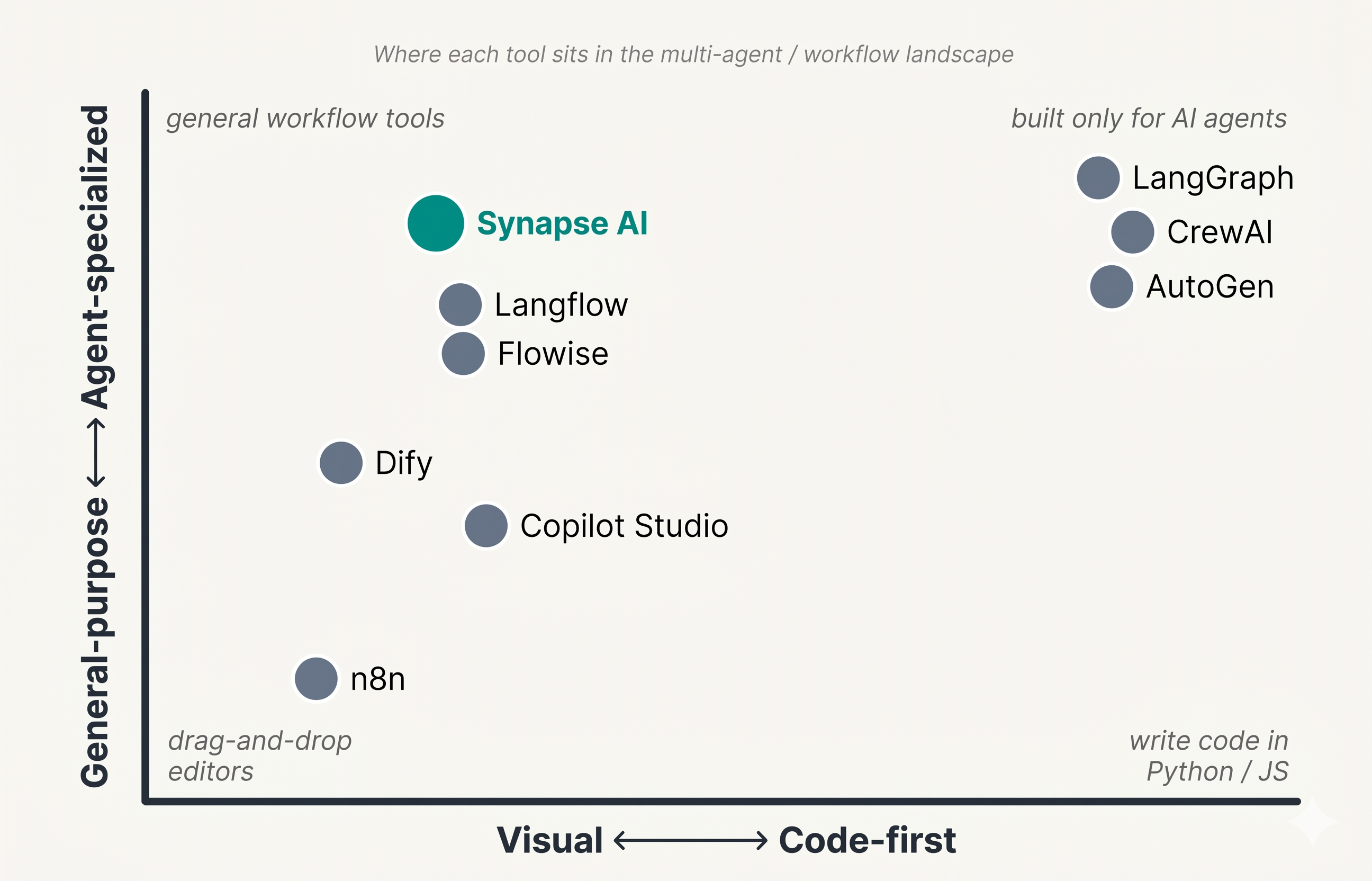
The space splits into three categories:
Visual workflow builders — direct overlap with each other, and the focus of this post:
- Synapse AI
- Dify
- Langflow
- Flowise
- n8n (with its AI agent nodes)
Code-first agent frameworks — different category, covered briefly because they often come up in the same evaluation:
- LangGraph
- CrewAI
- AutoGen
Enterprise low-code AI — mentioned for completeness, not compared in depth:
- Microsoft Copilot Studio
- Vellum
- Azure Promptflow
We'll go deep on the five visual builders and add a short honest section on when you'd skip a visual tool entirely and write Python.
What Each One Actually Is
Dify
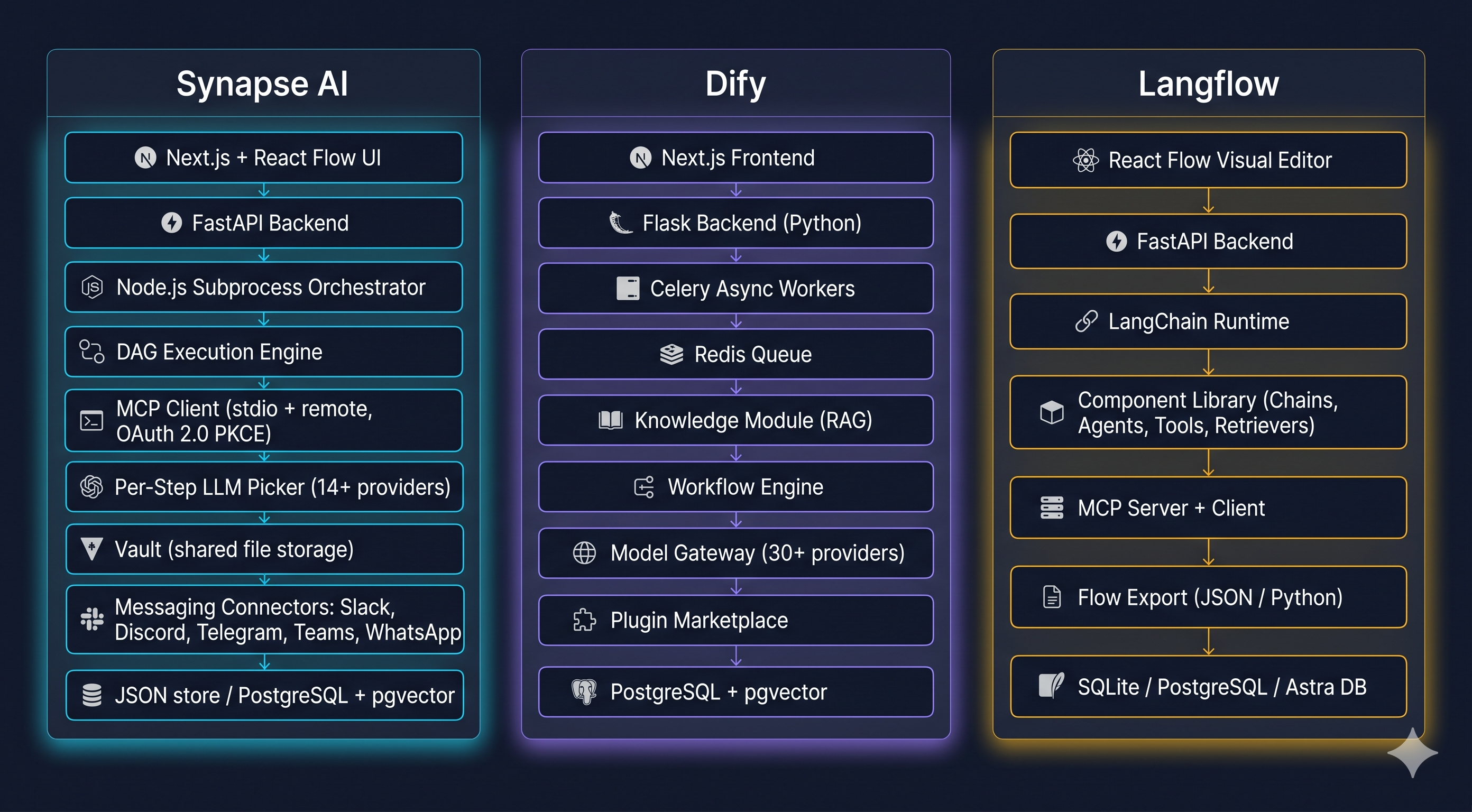
A workflow engine + RAG platform + app publishing layer, packaged together. Owns its runtime (not LangChain-based). Backend is Python on Flask with Celery for async jobs, Redis, PostgreSQL, and pgvector. Frontend is Next.js + React.
Core capabilities:
- Five app modes: Chatbot, Agent, Chatflow, Workflow, Text Generation
- Workflow nodes including LLM, Knowledge Retrieval, Code (sandboxed Python/JS), Question Classifier, IF/ELSE, Iteration, HTTP, Tool, Variable Aggregator, Parameter Extractor, Template
- Agent strategies: Function Calling + ReAct
- Full knowledge module: document ingestion, parent-child chunking, embedding, vector storage (Weaviate, Qdrant, Milvus, pgvector), hybrid search, reranking
- ~30+ model providers via a unified gateway
- Tools: built-in catalog + custom OpenAPI imports + plugin marketplace
- Publishing: REST API per app, embeddable web widget, public chat URL
- Multi-tenancy with workspaces, members, roles
- Observability: cost tracking, conversation logs, user feedback annotations, eval dashboards
Langflow
A visual editor sitting on top of LangChain. Each node maps to a LangChain class. Backend is Python FastAPI; frontend is React Flow.
Core capabilities:
- Visual graph editor with the LangChain ecosystem as the component library
- Component types: Models, Prompts, Memory, Chains, Agents, Tools, Vector Stores, Embeddings, Retrievers, Document Loaders, Text Splitters, Output Parsers
- Custom components written in Python (extends LangChain)
- MCP both ways: can consume MCP servers as tools, and each flow can be exposed as an MCP tool
- Flow export to JSON or runnable Python code
- Astra DB / DataStax native integration
- Each flow exposed as a REST endpoint
- Typed flow inputs and outputs
Flowise
Effectively "Langflow for the JavaScript world." Built on LangChain.js. Backend is Node.js + TypeScript. Lighter footprint than Langflow.
Core capabilities:
- Visual editor with LangChain.js components as nodes
- SQLite, Postgres, or MySQL for storage
- Multi-tenant via API keys
- Open-source MIT license
- Similar feature surface to Langflow but in the JS stack
n8n (with AI agent nodes)
n8n is fundamentally a general workflow automation tool — think Zapier with self-hosting. It added AI agent and LangChain nodes in 2024–2025 that let you wire LLMs into the rest of your automation.
Core capabilities:
- 400+ integrations to non-AI systems (databases, SaaS apps, queues, etc.)
- AI Agent node, Chat Trigger, vector store integrations, embeddings, memory nodes
- Self-host (AGPL) or cloud
- Excellent for "I already use n8n; let me add AI" use cases
- Less specialized for multi-agent orchestration than the tools above
Synapse AI
Imagine an Airflow DAG, but every step can be an agent. Steps branch on agent outputs, pause for days waiting on a human in Slack, spawn focused sub-agents mid-run, and switch models per step — cheap classifier here, frontier model there. That's Synapse.
A deterministic DAG executor with a ReAct chat layer on top. MCP-first, with sub-agent spawning, durable pause/resume, and human-in-the-loop via messaging channels as core concepts. Backend is Python FastAPI + Node.js subprocess orchestration; frontend is Next.js + React Flow. Persistence is JSON files by default, with optional PostgreSQL + pgvector for code indexing.
Core capabilities:
- Two execution models: ReAct chat agents and DAG orchestrations
- Rich step types: AGENT, LLM, TOOL, EVALUATOR, PARALLEL, LOOP, HUMAN, SWITCH, IF_ELSE, TRANSFORM
- 14+ model providers with per-step model selection as a first-class concept
- MCP-first tools: stdio + remote with OAuth 2.0 PKCE handled natively
- Sub-agent spawning at runtime — agents delegate to ephemeral focused sub-agents
- Durable pause/resume: workflows survive restarts and pause for days waiting on human input
- HITL via Slack, Discord, Telegram, Teams, WhatsApp — humans approve workflow steps in the messaging app they already live in
- Vault: persistent agent-shared file storage
- Built-in cron scheduling for orchestrations
- Usage observability: cost/token analytics grouped by model and session, a BarChart cost breakdown, latency per call, paginated logs with filters, and an editable per-model pricing table
- External API: REST + SSE for chat, orchestration trigger, resume, and discovery — all key-auth'd
Code-first frameworks (briefly)
LangGraph is the production-grade Python framework from the LangChain team for stateful agent graphs. State machines, persistence, time-travel debugging. No visual editor by default; LangGraph Studio adds inspection but you author in code.
CrewAI is a code-first multi-agent Python framework built around Crew + Tasks + Agents + Process (sequential/hierarchical). Opinionated and small surface area.
AutoGen is Microsoft's multi-agent research framework — conversable agents, GroupChat, group orchestration in Python.
You'd skip the visual tools entirely and reach for these when:
- The workflow is too dynamic/complex to express in a graph
- You need fine-grained typing and IDE refactoring across the agent code
- The team is comfortable with Python and doesn't want a separate runtime to manage
For everything else, the visual builders win on iteration speed.
Architecture-Level Differences
| Tool | Runtime | Visual? | Persistence | Deployment |
|---|---|---|---|---|
| Synapse | Own DAG engine (Python + Node) | Yes | JSON files (default) or PostgreSQL + pgvector | Self-host via pip / npm / Docker |
| Dify | Own engine (Python/Flask + Celery) | Yes | PostgreSQL + Redis + pgvector | Self-host + Cloud SaaS |
| Langflow | LangChain runtime (FastAPI) | Yes | SQLite or PostgreSQL | Self-host + Cloud |
| Flowise | LangChain.js runtime (Node) | Yes | SQLite / Postgres / MySQL | Self-host + Cloud |
| n8n | Own automation engine + AI nodes | Yes | SQLite / Postgres | Self-host + Cloud |
| LangGraph | Python library, no UI | No (Studio adds inspection) | App-defined | Embed in your app |
| CrewAI | Python library, no UI | No | App-defined | Embed in your app |
A few things are worth noticing in this table:
- Runtime ownership matters. Synapse, Dify, and n8n own their workflow engines. Langflow and Flowise ride on LangChain (Python and JS respectively). If LangChain shifts its abstractions, Langflow and Flowise inherit that. If LangChain has a bug in graph execution, your workflow has that bug.
- Python vs JS. Most tools are Python-first. Flowise is the JS option. n8n is JS but its AI nodes ride on LangChain.js internally.
- Persistence shape. Dify requires Postgres + Redis + pgvector — heavier infra. Synapse can run on a JSON file store, which makes single-user / local deployments effectively zero-infra.
- Cloud SaaS availability. Dify, Langflow, Flowise, and n8n all ship managed clouds. Synapse is self-host only. That's a real trade-off — convenient for some, dealbreaker for others, depending on data residency requirements.
The Capability Matrix
Here's the side-by-side, grouped by capability area. ✓ = first-class supported, ⚡ = supported but not a focus, ✗ = not supported.
Workflow primitives
| Capability | Synapse | Dify | Langflow | Flowise | n8n |
|---|---|---|---|---|---|
| Visual editor | ✓ | ✓ | ✓ | ✓ | ✓ |
| DAG with explicit step types | ✓ (AGENT, LLM, TOOL, EVALUATOR, PARALLEL, LOOP, HUMAN, SWITCH, IF_ELSE, TRANSFORM) | ⚡ (LLM, KR, Code, IF/ELSE, Iteration, Q-Classifier, etc.) | ⚡ (LangChain chain semantics) | ⚡ (LangChain chain semantics) | ⚡ (workflow nodes + AI agent) |
| Branching (IF/ELSE, switch) | ✓ | ✓ | ⚡ | ⚡ | ✓ |
| Iteration / loops | ✓ | ✓ | ⚡ | ⚡ | ✓ |
| Parallel execution | ✓ | ⚡ | ⚡ | ⚡ | ✓ |
| Evaluator gates | ✓ | ⚡ | ✗ | ✗ | ✗ |
| Variable transforms | ✓ | ✓ | ⚡ | ⚡ | ✓ |
Agent execution
| Capability | Synapse | Dify | Langflow | Flowise | n8n |
|---|---|---|---|---|---|
| ReAct loop | ✓ | ✓ | ✓ | ✓ | ✓ |
| Function calling | ✓ | ✓ | ✓ | ✓ | ✓ |
| Multi-agent workflows | ✓ | ⚡ | ⚡ | ⚡ | ⚡ |
| Sub-agent spawning at runtime | ✓ | ✗ | ✗ | ✗ | ✗ |
| Per-step multi-model selection | ✓ | ⚡ | ⚡ | ⚡ | ⚡ |
Tools and integrations
| Capability | Synapse | Dify | Langflow | Flowise | n8n |
|---|---|---|---|---|---|
| MCP client (stdio) | ✓ | ⚡ | ✓ | ⚡ | ✗ |
| MCP client (remote + OAuth) | ✓ (OAuth 2.0 PKCE native) | ⚡ | ⚡ | ⚡ | ✗ |
| Expose flows as MCP server | ⚡ | ✗ | ✓ | ✗ | ✗ |
| Custom HTTP tools | ✓ | ✓ | ✓ | ✓ | ✓ |
| Built-in tool library size | Small (MCP-first) | Large | Large (via LangChain) | Large (via LangChain) | Very large (400+) |
| Code execution | ✓ (Bash, Python via tools) | ✓ (sandboxed Py/JS) | ✓ | ✓ | ✓ |
RAG and knowledge
| Capability | Synapse | Dify | Langflow | Flowise | n8n |
|---|---|---|---|---|---|
| Dataset management UI | ✗ | ✓ (full stack) | ✗ | ✗ | ✗ |
| Document ingestion pipeline | ✗ | ✓ | ⚡ (per-component) | ⚡ | ⚡ |
| Chunking strategies | ✗ | ✓ (general, parent-child, Q&A) | ⚡ | ⚡ | ⚡ |
| Hybrid search + reranking | ✗ | ✓ | ⚡ | ⚡ | ⚡ |
| Code repo indexing | ✓ (cocoindex + pgvector) | ✗ | ✗ | ✗ | ✗ |
Human-in-the-loop
| Capability | Synapse | Dify | Langflow | Flowise | n8n |
|---|---|---|---|---|---|
| Approval / pause steps | ✓ | ⚡ | ✗ | ✗ | ⚡ (webhook-based) |
| Durable pause/resume (days) | ✓ | ✗ | ✗ | ✗ | ⚡ |
| HITL via Slack | ✓ | ⚡ | ✗ | ✗ | ⚡ |
| HITL via Discord / Telegram / Teams / WhatsApp | ✓ | ✗ | ✗ | ✗ | ⚡ |
| Web HITL form | ✓ | ✓ | ✗ | ✗ | ✓ |
Operations
| Capability | Synapse | Dify | Langflow | Flowise | n8n |
|---|---|---|---|---|---|
| Built-in cron scheduling | ✓ | ⚡ (plugin) | ✗ | ✗ | ✓ |
| Execution logs | ✓ | ✓ | ✓ | ✓ | ✓ |
| Cost / token dashboards | ✓ (grouped by model and session) | ✓ | ⚡ | ⚡ | ⚡ |
| Per-call latency tracking | ✓ | ✓ | ⚡ | ⚡ | ✓ |
| Editable per-model pricing table | ✓ | ✓ | ✗ | ✗ | ✗ |
| Eval dashboards (LLM-as-judge) | ✗ | ✓ | ✗ | ✗ | ✗ |
| Conversation feedback annotations | ✗ | ✓ | ✗ | ✗ | ✗ |
Publishing and distribution
| Capability | Synapse | Dify | Langflow | Flowise | n8n |
|---|---|---|---|---|---|
| REST API per workflow | ✓ | ✓ | ✓ | ✓ | ✓ (webhook) |
| SSE streaming | ✓ | ✓ | ⚡ | ⚡ | ✗ |
| API resume verb for paused runs | ✓ | ✗ | ✗ | ✗ | ⚡ |
| Embeddable chat widget | ✗ | ✓ | ✗ | ⚡ | ✗ |
| Public chat URL | ✗ | ✓ | ✗ | ✗ | ✗ |
| Flow export to runnable code | ✗ | ✗ | ✓ (Python) | ⚡ | ✗ |
| Multi-tenancy (workspaces) | ✗ | ✓ | ⚡ | ⚡ | ✓ |
| RBAC / SSO | ✗ | ✓ | ⚡ | ⚡ | ✓ |
| Plugin / template marketplace | ✗ | ✓ | ⚡ | ⚡ | ✓ |
| License | AGPL-3.0 | Apache 2.0 (with cloud restrictions) | MIT | Apache 2.0 | Sustainable Use / Fair-code |
Where Each Tool Wins
Cutting away the matrix noise — here's what each tool is technically the best pick for.
Dify wins at
- End-to-end customer-facing AI app delivery: RAG + chat + publish + analytics in one product
- Multi-tenant SaaS where customers each get their own workspace
- Embeddable AI widgets on a marketing site
- No-code dataset and RAG management
- Out-of-the-box conversation observability with user feedback collection
Langflow wins at
- LangChain ecosystem interop — if your team already builds with LangChain
- Visual prototyping that exports to runnable Python code
- Exposing each flow as an MCP tool (rare capability)
- Astra DB / DataStax-native deployments
Flowise wins at
- JavaScript / Node.js shops that want a LangChain visual surface in their existing stack
- Lightweight self-hosting with minimal infrastructure
n8n wins at
- Wiring AI into existing business automation across 400+ non-AI integrations
- Teams already running n8n that want to add AI nodes incrementally without a separate platform
LangGraph wins at
- Production-grade code-first agent graphs with strict typing and IDE refactoring
- Tight integration with the rest of the LangChain stack
CrewAI wins at
- Quick role-based multi-agent setups with minimal code
- Autonomous research / writing / analysis crews
Synapse AI wins at
- Deterministic multi-agent DAGs with explicit control flow (PARALLEL, LOOP, SWITCH, IF_ELSE, EVALUATOR, TRANSFORM, HUMAN)
- Long-running workflows that pause for days waiting on human input
- Human-in-the-loop via the messaging apps humans actually use — Slack, Discord, Telegram, Teams, WhatsApp
- MCP as a first-class tool surface, including remote MCP servers with OAuth 2.0 PKCE
- Sub-agent spawning at runtime — agents delegating to focused ephemeral sub-agents
- Per-step multi-model orchestration as a core concept (cheap classifier here, frontier model there, in one declarative DAG)
- Local / air-gapped deployment with Ollama and local MCP servers as first-class peers
- Built-in cron scheduling for orchestrations
- REST + SSE API including the resume verb for paused workflows
What Problems Synapse Solves That Others Don't
Stripped of marketing, there are four genuinely distinct problem shapes Synapse handles that no other tool on this list handles end-to-end today. They're worth reading slowly — if any of them is on your roadmap, the rest of this post stops being abstract.
1. Multi-day workflows that pause for a human, then resume on their own.
A webhook from your billing system fires the workflow at 11pm. An agent pulls the order from Postgres, runs three fraud-signal tools in parallel, computes a recommendation, and hits a HUMAN step pointed at #finance in Slack. The thread reads: "Refund $340 to Jane Doe, order #4521? Risk score: 0.12 (low)." Three days later your CFO taps 👍 from a hotel. Synapse picks up where it left off — calls Stripe, emails Jane, writes a ledger entry, posts back to the same Slack thread with the receipt.
In Dify or Langflow, the same flow means stitching webhooks, queues, and external state machines yourself. In Synapse, it's one orchestration, one HUMAN step, one Slack channel binding. You wrote zero glue.
2. Mid-execution sub-agent delegation.
A market-analysis agent reaches step 4 of its DAG: "analyze the top five competitors." Instead of cramming five competitors into one context window, it spawns five ephemeral sub-agents in parallel — each with its own focused brief, its own tool budget, its own model. They each return a structured finding. The parent agent merges them and continues to step 5.
This pattern is how the best human teams work. No other tool on this list ships it as a built-in primitive. In LangGraph or CrewAI you can hand-roll it; in the visual builders you can't really model it at all.
3. Authenticated remote MCP servers, no glue code.
Your company runs a private MCP server for internal HR records, sitting behind OAuth. In Synapse, you click Add MCP server, paste the URL, complete the OAuth flow in a browser tab, and your agents can call it on the next run. PKCE handled. Tokens stored. Refresh logic baked in.
In most other tools, MCP is a plugin — usually stdio-only — and remote MCP with OAuth means writing the auth wrapper yourself. If your enterprise is moving toward MCP for internal data access (and most are), this is the difference between a one-click integration and a one-week project.
4. A different model on every step, with cost tracked per model per run.
Step 1: cheap Llama 3.1 on Ollama, classifying user intent in 50ms. Step 2: GPT-4o for the actual reasoning. Step 3: Gemini Flash for summarization. Step 4: Claude Sonnet for the final write-up. Step 5: a vision model on a screenshot the user uploaded.
Per-step. Same DAG. The Usage tab shows cost broken down by model, by session, by run — so you can see "this orchestration cost $0.04, of which $0.001 was Llama and $0.038 was GPT-4o" and tune accordingly. Other tools can do this with effort. Synapse treats it as the default workflow shape, because cost discipline at scale is the difference between an agent demo and an agent product.
If your problem touches two or more of these, nothing else on this list maps cleanly.
Where Synapse Honestly Loses
Now the section that matters most. Here's where Synapse is the wrong pick today — read it carefully before you decide it's right:
- No built-in RAG pipeline. No dataset UI, no chunking strategies, no embedding management, no hybrid-search-plus-reranking workflow. You'd build this yourself or wire to an MCP server. If your problem is "users chat with my docs," Dify wins this on day one.
- No multi-tenancy. No workspaces, no role-based access control, no SSO. Single-instance only. If you need each customer or each team to have their own walled-off workspace, Dify is the only honest pick here.
- No embeddable widget. Can't drop a
<script>tag on a marketing page to add a chatbot. Dify ships this; Synapse doesn't. - No flow-to-code export. Langflow can export a flow to runnable Python code. Synapse can't.
- Smaller built-in tool library. Synapse relies on the MCP ecosystem for tool diversity rather than shipping hundreds of pre-built integrations like n8n.
- No marketplace or template gallery. Dify, Langflow, and n8n all have these.
- Observability is functional, not flashy. Synapse does ship a Usage tab with cost and token analytics grouped by model and session, a BarChart cost breakdown, latency per call, paginated per-call logs with filters, and an editable per-model pricing table — comparable in substance to Dify's LLMOps view. What it lacks vs Dify is conversation-level user feedback collection (thumbs up/down annotations), LLM-as-judge eval dashboards on golden sets, and per-published-app analytics dashboards aimed at app owners.
- No managed cloud. Self-host only. If your team wants a hosted "just give us a URL" option, Synapse doesn't offer that today.
If you're building a customer-facing chatbot over your docs with a multi-tenant team experience, Synapse is the wrong tool — pick Dify. If you're building visual prototypes that you'll later port to Python, pick Langflow. If you live in n8n already, add AI nodes there instead of bringing in a second tool.
They're Not Competing for the Same Job
The honest synthesis: these tools share a visual-node-editor aesthetic, which makes them look like competitors. Architecturally, they have different centers of gravity.
- Dify's center of gravity is "ship an AI app to users." RAG, multi-tenancy, embed widgets, publishing — every architectural decision orbits that goal.
- Langflow's center of gravity is "prototype LangChain visually." The component library is LangChain. The export target is Python. The integrations are LangChain integrations.
- Flowise's center of gravity is the same as Langflow, in JavaScript.
- n8n's center of gravity is "automate business workflows." AI is one node category among 400+.
- Synapse's center of gravity is "deterministic, long-running, multi-agent systems with humans in the loop." Step types, pause/resume, messaging-channel HITL, MCP-first design, sub-agent spawning — every decision orbits that goal.
Pick by the shape of your problem, not by the feature checklist of the moment. Three of these tools could do your job adequately for most simple cases; only one will do it well for the specific case you actually have.
If your case looks like the scenarios at the top of this post — long-running, multi-agent, human-in-the-loop, MCP-heavy — Synapse was built exactly for that. Take one real problem from your work, picture it as a Synapse orchestration with HUMAN steps where the approvals live and AGENT steps where the thinking happens, and see whether the shape fits. That's the only comparison that ends with a useful answer.