Your team is paying $200–$400/month for Claude Pro or ChatGPT Plus. Or your API costs are climbing fast as you automate more workflows. You're wondering: is there a smarter way to use AI without the bill scaling linearly with every task?
There is. The problem isn't that LLMs are expensive — it's that most AI tools treat every single step of every task as a full LLM call, regardless of whether reasoning is actually needed. Fetching a web page becomes an LLM call. Looking up a CRM record becomes an LLM call. Checking whether a result is already good enough becomes an LLM call. Every interaction carries the full context window and gets billed at your most expensive model's rate.
SynapseOrch was built around a different architecture: mix LLM steps with non-LLM steps, use the cheapest model that can handle each job, cache repeated context aggressively, and skip steps entirely when the output already exists. Here's exactly how each of those decisions translates into lower costs.
The Core Problem: Every Step Is an LLM Call
Tools like Claude Projects, ChatGPT, n8n AI, and Flowise are LLM-first by design. Every interaction — data retrieval, record lookups, routing decisions, simple checks — routes through the full model. This isn't a flaw; it's the architectural bet they made to keep things simple.
The cost compounds quickly. A five-competitor research-and-report task becomes ten LLM calls, each carrying the full accumulated context. Week after week, the same research gets re-done from scratch because there's no persistent state across conversations. And there's no mechanism to say "this step doesn't need an LLM" — the tool doesn't know the difference between a reasoning task and a data-fetching task.
This architecture works well for one-off queries. It gets expensive the moment you start running recurring workflows, multi-step pipelines, or tasks with predictable structure.
How SynapseOrch Approaches Cost Differently
In SynapseOrch, a workflow is a directed acyclic graph (DAG) of steps, and each step has an explicit type. Some step types involve an LLM call: AGENT, LLM, and EVALUATOR. Others don't: TOOL, TRANSFORM, IF_ELSE, SWITCH, HUMAN — these run deterministically with no tokens billed.
The rest of this post covers seven mechanisms that flow from this architecture. Together, they explain why the same workflow that costs $1.30/month in Claude typically costs $0.17/month in SynapseOrch — and how it compares to OpenClaw, LangChain, CrewAI, n8n, and Flowise.
1. Non-LLM Steps Do the Data Fetching
In SynapseOrch, a TOOL step makes a direct HTTP call or fires a native tool — scrape_url, crawl_multiple, extract_links, or any custom API endpoint you configure. No LLM is involved in executing these. The step calls the tool, gets the result, and writes it to the workflow state. Zero tokens billed.
A TRANSFORM step runs Python code against the workflow state — also zero LLM cost. Use it to parse, filter, reshape, or compute anything before handing results to an agent.
In most AI tools, even asking "fetch the content of this URL" passes through the LLM. The model receives the request, decides to use the browsing tool, fires it, and processes the response — token overhead on both sides of every tool interaction. In SynapseOrch, that entire exchange collapses into one deterministic step:
{
  "id": "step_scrape",
  "name": "Scrape Competitor Page",
  "type": "tool",
  "forced_tool": "scrape_url",
  "output_key": "competitor_raw"
}
Scraping five competitor pages is five HTTP calls. Not five LLM calls.
2. Per-Step Model Selection — Pay for What Each Step Actually Needs
The model field in SynapseOrch is a per-step configuration. An evaluator checking whether research is thorough enough can run on claude-haiku-4-5 — fast, cheap, perfectly capable of a binary routing decision. The final writing step runs on claude-sonnet-4-6 because it genuinely needs the synthesis quality.
Claude Haiku is roughly 12–15× cheaper per token than Claude Sonnet. A routing decision that takes 500 tokens costs ~92% less when routed through Haiku. Some other tools support per-node model selection too (n8n's AI nodes, hand-coded LangGraph), but SynapseOrch exposes it as a first-class property of the DAG that pairs with automatic caching and non-LLM step types — so picking the right model per step is part of the natural building experience, not a manual optimization you bolt on later.
| Step | Model | Reason |
|---|---|---|
| Evaluator: Is research sufficient? | claude-haiku-4-5 | Binary routing decision |
| Evaluator: Does draft meet quality bar? | claude-haiku-4-5 | Structural check, not synthesis |
| Agent: Write the final report | claude-sonnet-4-6 | Synthesis, nuance, quality output |
| Agent: Complex multi-hop reasoning | claude-opus-4-7 | Used sparingly, only when needed |
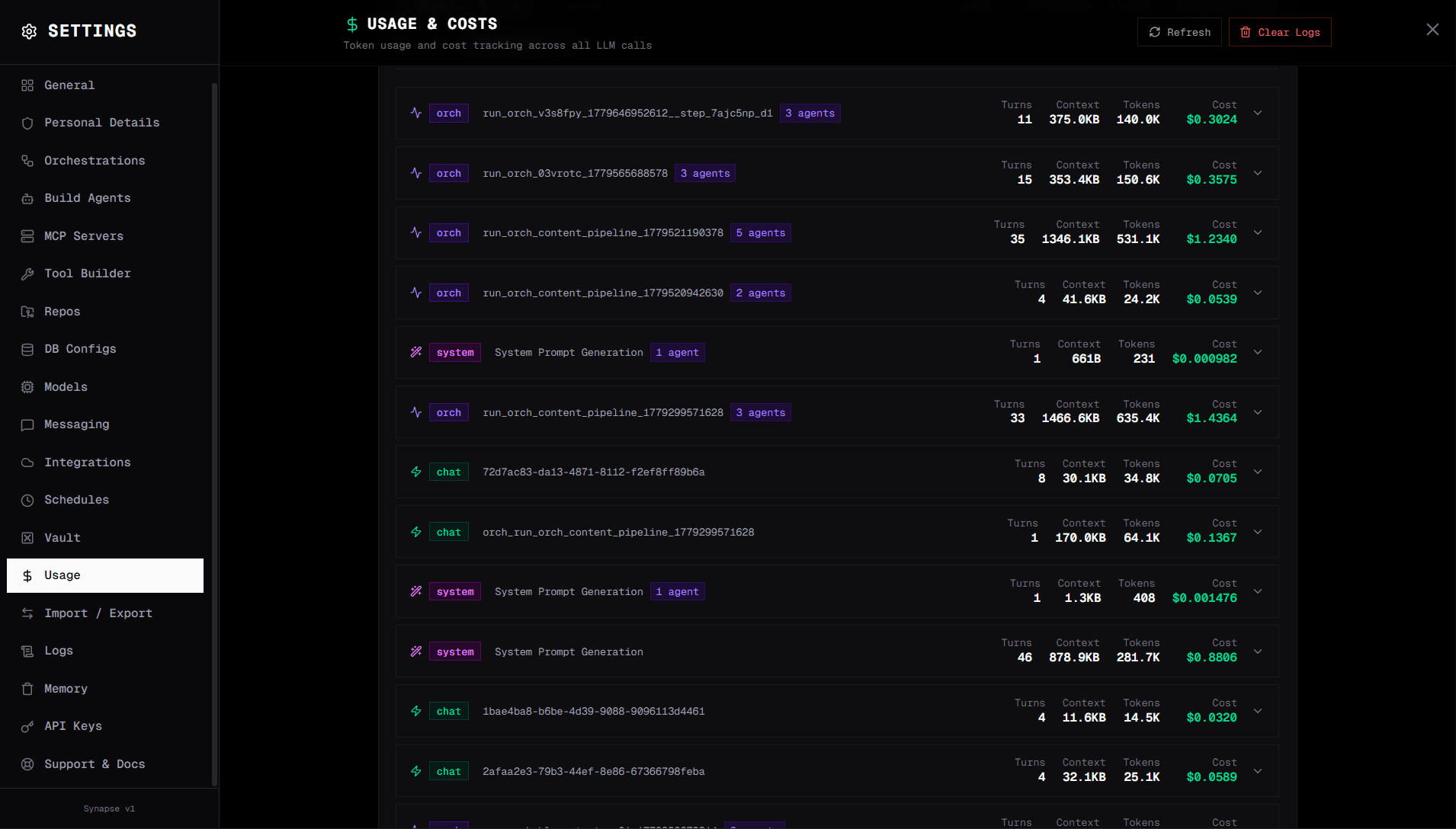
The Usage tab under Runs in SynapseOrch breaks cost down by model and session, so you can see exactly which steps are consuming budget and tune accordingly.
3. Prompt Caching Runs Automatically
SynapseOrch applies Anthropic's prompt caching to every LLM call with no configuration required. If your system prompt is over roughly 4,000 characters, SynapseOrch automatically adds cache_control: ephemeral markers to the stable prefix — your agent instructions, persona, and tool descriptions. These stay byte-identical across runs, which is the prerequisite for a cache hit.
Cache reads are billed at 0.1× the normal input rate — a 90% discount on every token in that prefix. Cache writes cost ~1.25× on the first call, but pay for themselves the second time the same prefix is used.
For scheduled workflows — daily reports, weekly research, recurring automations — this compounds. By week three or four, the majority of input tokens on every run are cache hits. The system prompt, the tool list, and any large stable context you've injected are all cached.
If you're using OpenAI models, SynapseOrch extracts and reports automatic caching (50% discount on cached prefixes ≥ 1,024 tokens). DeepSeek models get the same 0.1× cache-read rate as Anthropic. The mechanism is transparent regardless of which provider you're using.
No configuration required. The Usage tab under Runs shows cache_read_tokens and cache_write_tokens per run so you can see it working.
4. Vault Prevents Redundant Work Across Steps and Runs
When an agent step completes, it can write its output to the vault via vault_write. Downstream steps read from the vault via vault_read — direct file I/O, no LLM tokens consumed.
This matters in two ways. Within a single run, if the research agent has already gathered and saved competitor data, the writing agent reads it from the vault rather than triggering another research call. Across multiple runs, if last Tuesday's research is still fresh, this week's workflow can read from the vault and skip the research steps entirely.
Claude.ai and ChatGPT have no answer to this problem. Every new conversation starts from scratch. There is no cross-session memory, no way to say "I already researched this three days ago — use that." The LLM re-researches everything from the beginning every time. You pay full price every time.
An IF_ELSE step in SynapseOrch can check a timestamp in the vault state and route around research steps when data is fresh enough — a decision that costs zero tokens.
5. Conditional Routing Skips Expensive Steps Entirely
Evaluator steps make routing decisions. If the data already meets quality criteria, the workflow routes directly to the next meaningful step — skipping re-processing that isn't needed. The evaluator call itself is cheap: Haiku model, short context, binary output.
{
  "id": "step_eval_research",
  "name": "Is Research Fresh and Complete?",
  "type": "evaluator",
  "model": "claude-haiku-4-5",
  "evaluator_prompt": "Check if the vault data was written within the last 7 days and covers all 5 competitors with at least 3 facts each. If yes, choose 'use_cached'. If not, choose 'refresh'.",
  "route_map": {
    "use_cached": "step_write_report",
    "refresh": "step_scrape"
  }
}
An IF_ELSE step can run a Python expression against workflow state — zero LLM cost. For example: if the vault timestamp is within range, jump to writing; otherwise scrape.
In Claude.ai or ChatGPT, the tool always processes the full chain. There's no concept of "the previous result was already good enough, skip the next step." Every run does the same amount of work regardless of whether the inputs changed.
For recurring workflows where inputs are often stable week-to-week — competitor monitoring, market research, status checks — this routing can eliminate the majority of expensive steps most of the time.
6. Deterministic Sequences Beat Agent Loops When the Workflow Is Known
This one is worth its own section because it's the single biggest cost mistake most teams make: defaulting to an autonomous agent for a workflow they already know the shape of.
An agent works by looping. It receives a goal, calls the LLM to decide which tool to invoke, runs the tool, calls the LLM again to interpret the result, decides the next action, runs the next tool, and so on. Each "decide what to do next" step is a full LLM call that re-sends the entire conversation context. A five-tool task can easily turn into eight or ten LLM calls before the agent finishes — and if it picks the wrong tool, there's a recovery loop with even more tokens spent explaining the error.
If you know the steps in advance — and most production workflows are predictable — you don't need an agent making decisions. You need a fixed sequence: TOOL → LLM → TOOL → LLM → DONE. Same outcome, a fraction of the tokens.
Compare a customer support ticket flow:
| Approach | LLM calls per ticket | What happens |
|---|---|---|
| Agent with 5 tools | 6–10 | Agent thinks → picks tool → thinks → picks next tool → thinks → responds. Each "think" sends full context. |
| Deterministic orchestration | 1–2 | TOOL fetches ticket → TOOL fetches CRM → LLM classifies → IF_ELSE → LLM responds (only if needed) |
The deterministic version skips every "what should I do next?" call because the answer is hardcoded into the DAG edges. The LLM only runs where reasoning is actually required — classification and response generation.
When should you use an agent? When the path genuinely depends on what the LLM discovers — open-ended research, exploratory debugging, anything where the next tool depends on the result of the previous one in a way you can't predict. For those cases, agents are the right tool. For repeatable workflows with known structure, agents are an expensive abstraction.
In SynapseOrch, both are first-class: drop in an AGENT step where you need autonomy, wire up explicit TOOL/LLM sequences where you don't. Most production workflows end up being mostly the latter.
Putting It Together — Two Real Cost Comparisons
Weekly Competitive Intelligence Report (5 Competitors)
A team needs a weekly report covering five competitors: research, then summarize. They run it every Monday morning.
Claude.ai or ChatGPT approach:
| Step | What Happens | Tokens (est.) | Cost (est.) |
|---|---|---|---|
| Research: Competitor 1 | Full LLM call with browsing | ~30K input | ~$0.045 |
| Research: Competitors 2–5 | × 4 more full LLM calls | ~120K input | ~$0.180 |
| Write report | Full LLM call, all context loaded | ~40K in + 5K out | ~$0.098 |
| Week 2, 3, 4… | No caching, no state — repeats fully | Same cost | ~$0.323/week |
| Monthly (× 4 weeks) | ~$1.30/month |
Based on Claude Sonnet pricing (~$3/MTok input, $15/MTok output). Actual usage varies.
SynapseOrch approach:
| Step | What Happens | Tokens (est.) | Cost (est.) |
|---|---|---|---|
| Scrape 5 competitor pages | scrape_url × 5, TOOL steps | 0 LLM tokens | $0.00 |
| Freshness check | Haiku EVALUATOR, ~1K tokens | ~1K input | ~$0.00025 |
| Write report | Sonnet AGENT | ~15K in + 3K out | ~$0.054 |
| System prompt cache (week 1 write) | ~2K tokens at 1.25× | one-time premium | tiny |
| Weeks 2–4: cache hits | ~2K tokens at 0.1× per run | ~200 effective tokens | ~$0.0006/run |
| Monthly (× 4 weeks) | ~$0.17/month |
Roughly 7–8× cheaper per month — and the gap widens as cache hit rates accumulate and vault reads replace repeat research calls. These are rough estimates for illustration; your actual costs depend on report length and how much competitor data changes week-to-week. The structural advantage holds across realistic ranges.
Customer Support Ticket Automation
Classify an incoming ticket, fetch the customer's CRM record, and respond — or escalate to a human.
| Approach | How It Works | Cost per ticket |
|---|---|---|
| Claude / ChatGPT | Single LLM call with all context, CRM lookup via LLM-driven tool | ~$0.015–$0.030 |
| SynapseOrch | HTTP step fetches CRM (free) → Haiku classifies ticket → Sonnet handles ~15% complex tickets only | ~$0.001–$0.005 avg |
At 1,000 tickets/month: Claude approach runs ~$15–30/month. SynapseOrch runs ~$1–5/month.
Three things drive this gap. First, a non-LLM HTTP step fetches the CRM record — no token overhead for tool calling. Second, Haiku classifies the ticket: routine (auto-respond from a template) or complex (needs real reasoning). Only the ~15% of genuinely complex tickets reach the expensive model. Third, the system prompt containing your product knowledge and response templates is cached — 90% discount on those repeated tokens for every ticket after the first batch.
A note on the numbers above: These are illustrative estimates based on published per-token pricing for Claude Sonnet and Haiku at the time of writing. Real-world costs vary significantly with provider pricing changes, model choice, prompt length, output length, cache hit rates, how often inputs actually change between runs, your traffic patterns, and how aggressively you've tuned each step. Use these as directional comparisons, not invoices. The honest way to compare for your own workflow is to run it in both tools for a week and look at the actual bills.
How Other AI Tools Compare
The Claude/ChatGPT comparison is the most visible one because those are what most teams reach for first. But the same architectural questions apply to every AI tool on the market. Here's how the popular options stack up on the five things that actually drive cost.
| Tool | Architecture | Per-step models | Non-LLM steps | Automatic prompt caching | Persistent state |
|---|---|---|---|---|---|
| Claude.ai / ChatGPT | Single agent | One global | Via LLM-driven tool calls only | No | None across sessions |
| OpenClaw | Autonomous agent + heartbeats | One global | Via skills (LLM-mediated) | Inherits from provider | Local memory file |
| LangChain / LangGraph | Code-first; agent or graph | Possible if hand-coded | Possible if hand-coded | Manual | Manual |
| CrewAI | Multi-agent, role-based | One global typically | Tools per agent | Inherits | Limited shared memory |
| n8n AI / Zapier AI | Workflow + AI nodes | One per AI node | Yes (native, mature) | No | Workflow state only |
| Flowise / Dify / Langflow | Visual agent/chain builders | One global | Some | No automatic | Limited |
| SynapseOrch | Visual DAG, mixed step types | Yes, per step | First-class | Automatic | Vault (persistent across runs) |
A few honest notes on each:
OpenClaw is impressive as a personal AI assistant — it lives on your machine, talks to you through WhatsApp or Telegram, and has 50+ integrations. But it's agent-first by design (heartbeats, autonomous skill execution). For an always-on personal copilot that's exactly the right shape. For high-volume production workflows where you control the structure, the agent loop is more expensive than it needs to be.
LangChain and LangGraph are powerful and flexible — if you write the code carefully, you can absolutely build the same mixed step types and per-step model selection. The catch is that almost every tutorial, template, and starter project defaults to agent loops. Cost discipline depends entirely on developer effort, and most teams don't profile their token usage until the bill is already large.
CrewAI explicitly orchestrates multiple role-based agents that delegate to each other through LLM-mediated conversations. The agents-talking-to-agents pattern is elegant, but every handoff is another LLM call carrying full context. Beautiful demos, expensive in production.
n8n and Zapier with AI nodes are workflow tools that bolted AI onto existing automation primitives. The non-LLM steps are excellent (n8n has hundreds of integrations). But the AI nodes themselves are full LLM calls with no per-step model selection, no automatic prompt caching, and no shared vault state across runs. You'll cut costs on the workflow side but pay full price on the AI side.
Flowise, Dify, and Langflow are visual builders in the same space as SynapseOrch. They tend to be agent-first and don't expose per-step model selection or automatic caching as first-class properties of the canvas. The honest SynapseOrch vs Dify vs Langflow comparison goes deeper on these.
The pattern across all of them: tools optimized for flexibility or speed of building often leave cost on the table. SynapseOrch's bet is that explicit, typed step kinds plus automatic caching plus per-step model selection give you the same speed-of-building with structurally lower runtime cost.
What SynapseOrch Doesn't Help With
This is worth being direct about.
If your workflow is a one-off query with no recurring structure, SynapseOrch doesn't add much. The DAG setup overhead isn't worth it for a task you'll run once.
If your research steps genuinely require an LLM to reason about sources — not just fetch raw HTML, but evaluate credibility, reconcile contradictions, synthesize across documents — more AGENT steps are unavoidable. Non-LLM data fetching only goes so far when the work is inherently cognitive.
If prompt caching has nothing to cache — your system prompts are short or change every run — you won't see caching benefits.
And SynapseOrch is self-hosted. You manage the infrastructure. If you want managed AI at zero operational overhead, you're trading infra effort for the per-query cost difference. That's a real trade-off and the right call for some teams.
What's Next
If you're paying meaningful API bills today and your workflows involve recurring runs, multi-step research, data fetching from external sources, or classification decisions — the structural savings are real and they compound over time.
The most direct way to verify this is to take one workflow you're currently running in Claude or ChatGPT, replicate it in SynapseOrch, and run both in parallel for a week. The Usage tab under Runs will show you exactly what each run cost, broken down by model, step, and cache hit rate.
- Install SynapseOrch: docs.synapseorch.com/getting-started/installation
- Join the Discord to share your workflow and get input on where to cut costs: discord.gg/9UN45qyGh8