Features
What it does, and why it behaves.
Each of these nine exists because an automation went wrong without it. Everything else it does is listed below, one line each.
Build with AI
Describe the job. Approve the plan.
Tell it what you need in plain words. It replies with a plan you can read: the steps, the model for each, and where you sign off. Nothing is built until you say so.
- Change any step before it’s built, or later on the canvas
- Change with AI edits a workflow and applies the change only when you approve
- Its chat uses credits, like a run
Build with AINew workflowEvery Monday, review our suppliers and email ops a summary. I want to see it before it goes.
Needs your answer · The plan- 1Gather this week’s supplier dataMondays 07:00
- 2Score each supplierNova Lite
- 3Find open invoices and issuesKnowledge
- 4Write the reviewClaude Sonnet 4.5
- 5You approve itYour step
- 6Email it to the ops teamGmail
The same six steps every weekChange somethingBuild itYour sign-off
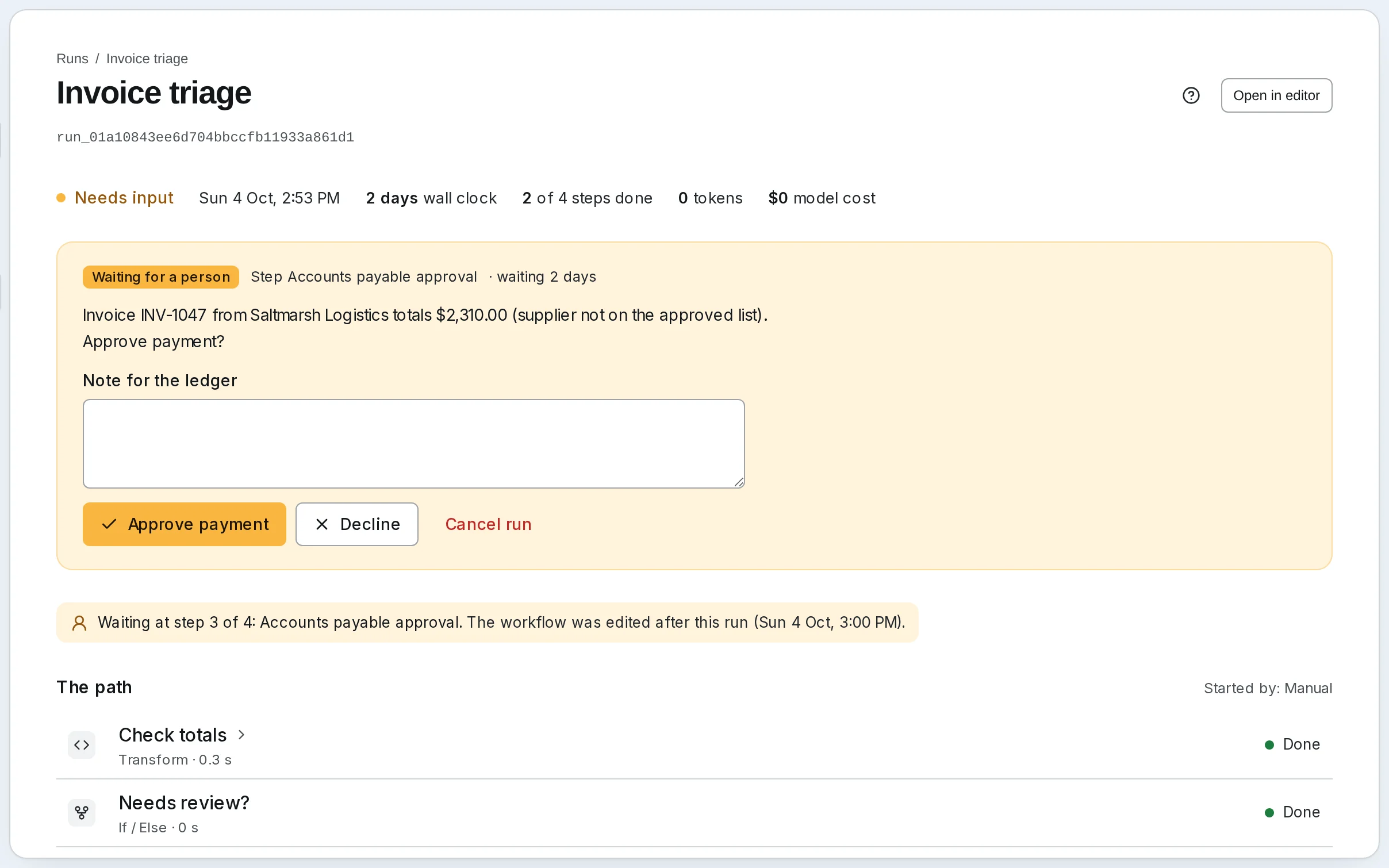
Nothing goes out without your yes
Add a sign-off wherever work leaves the building. The run waits, for minutes or days, at no cost, and asks you in the app or in Telegram (Teams and WhatsApp too when you self-host). Your answer carries it on.
- Approve, decline, or type what to change
- Waiting runs survive restarts and cost nothing
- Approve with one click from the email
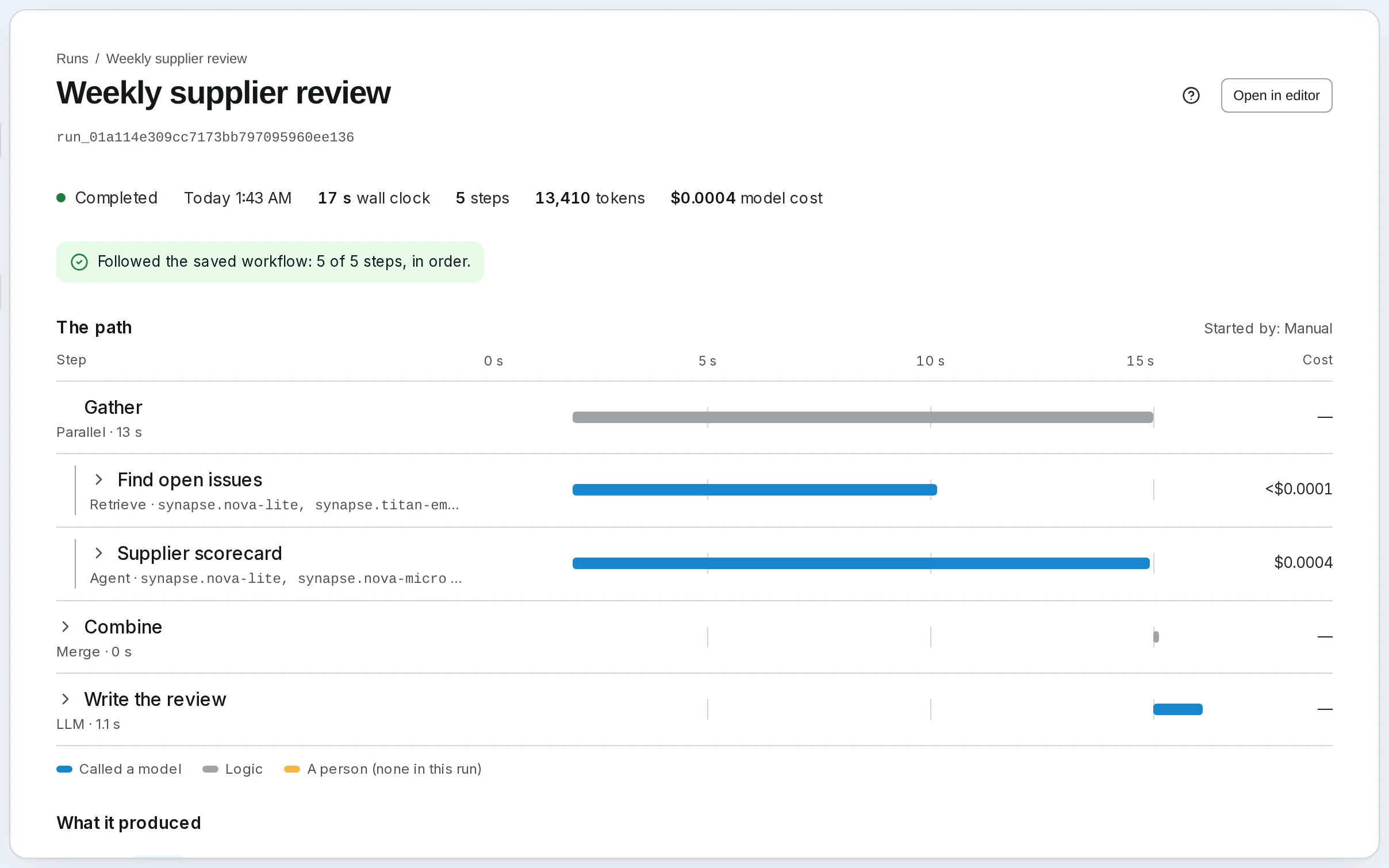
The path you approved
Watch it run the way you drew it
The route is decided before a run starts. Each run stays on that path, branching only where you put a check, and you can watch it step by step, with what each step took and cost.
- Checks, branches and data steps call no model and cost a tenth of a credit
- Steps side by side run at once and rejoin
- Seventeen kinds of step, drawn on a canvas
Cost
A bill you can read, and a limit it can’t pass
Every run shows each step’s model and what it cost. Use a small model for sorting and a strong one where judgment matters. Your plan stops at its limit, so there is never a surprise bill. And before a run, you see what it should cost.
- Spend by model and by day, in one place
- A step that does work is one credit, whichever model it uses
- Waiting for a person costs nothing
Your documents
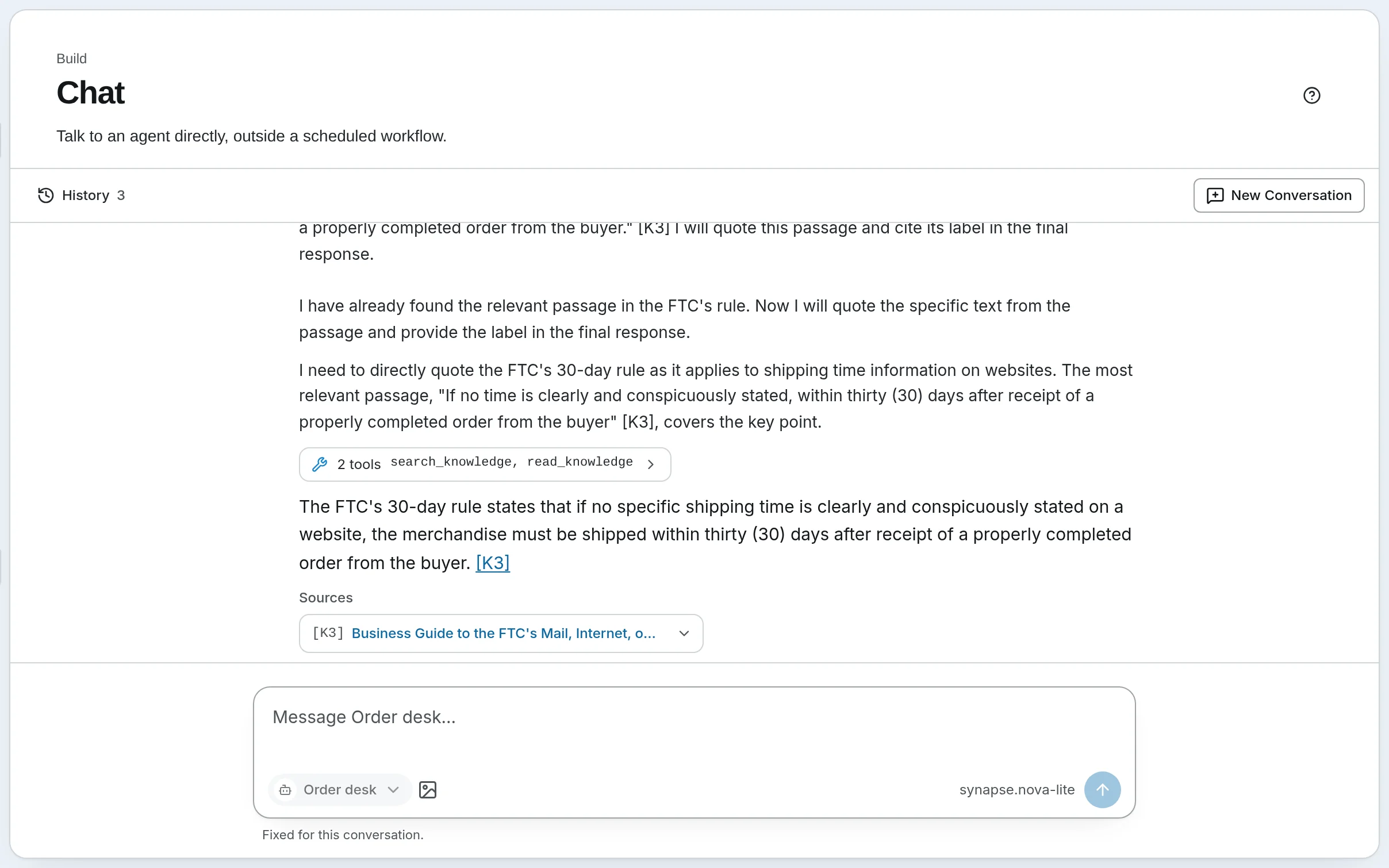
Answers from your own documents
Add files of almost any kind, or web pages: one page, a sitemap or a whole site. Agents answer from them and show the passage they used, and you can test a knowledge base on its own documents before you trust it.
- Search or add to a knowledge base from inside a workflow
- Tune how it searches, and see what each search cost
- Send records from your own systems by API
Your website and phone
Your agent, on your website and on the phone
Put an agent on your website as a chat widget, or connect your Twilio number to it. Visitors and callers reach the same agent, with the tools and knowledge you choose for them. On a call it says it is an AI, and puts the caller through to a person or takes a message.
- A chat widget on Solo (1), Team (5), Growth (10) and Business (25), in your colors, with your logo
- Your own numbers through Twilio
Any model
Any model, changed any time
Every agent and every step names its model. Change it, even in the middle of a conversation, and the agent keeps its instructions, its memory and its tools.
- A different model in each step, or none where none is needed
- 23+ providers with your own keys, or ours with no key
- Local models through Ollama when you self-host
Churn analystMemory · 14 turnsModelClaude Sonnet 4.5was Nova Lite- Pull last week’s churn numbers and draft the update.
Pulled 4 tables from Postgres. Churn is 3.1%, up from 1.9%. Drafting the update now.
- Tighten it and lead with the annual cohort.
Churn rose 1.2 pts last week, almost all of it in the annual cohort’s renewals…
Ask Churn analyst…Churn analystClaude Sonnet 4.5Agents
Set up an agent, then try it right there
Instructions, model, tools and knowledge on one side, a conversation with the agent on the other, so you see what a change does the moment you save it. A manager agent can hand work to helpers and gather their results.
- Helpers and managers, with freedom only where you grant it
- Skills it reads when a task calls for them, and a memory you can read and reset
- Workflows inside workflows, and steps that repeat
Use it from anywhere
From Claude, ChatGPT or your own code
Run your workflows from Claude, ChatGPT or Cursor through the MCP server, or start them from your own code with an API key.
- Sign in to the MCP server as yourself, with OAuth
- A public API with keys, and every agent as an OpenAI-compatible model
ClaudeMCPRun the weekly supplier review now.synapse · run_orchestrationStarted. It will ask you before it sends.Your codeAPIcurl -X POST \ …/api/v1/orchestrations/supplier-review/run \ -H "Authorization: Bearer $KEY"
Also included
And forty-five more. Open any one.
The stars above carry the story. Everything else is one line each.
Runtime
- The route is drawn before the run; a run goes only where the graph goes.
- Branching and reshaping data with no model in the loop.
- Independent branches run at once and rejoin.
- A client that reconnects catches up on the run.
Review
- Answer a waiting run from Home, the run page or a channel.Read the guide
- Rubrics, an LLM judge, golden sets and a trend per workflow, on every plan.Read the guide
- A bell for what needs you, what failed and what finished.
Agents
- Named instructions an agent reads only when a task calls for them.
- A memory per agent that you can read and reset.
- Files your agents read when a prompt names them, in folders you organize.
- Ready-made workflows with their agents and connections; once added, yours to change.
Models
- Anthropic, OpenAI, Google, xAI, DeepSeek, Mistral, Qwen, Kimi, Groq, OpenRouter, Bedrock, Ollama and more.
- Mix hosted and local models in one workflow when you self-host, or several hosted ones on Cloud.
- Cost, tokens and latency per call, in logs you can filter.
- Self-hosted, set each model’s rate so reported cost matches your provider’s bill.
Knowledge
- Files and web pages, indexed; answers cite the passage they used.Read the guide
- Search a base, or fill one, from inside a workflow.
- Keyword and vector search fused, with an optional reranker.
- PDFs, Office files, email and more, records sent by API, and pages read by SynapseBot.
- A monthly cap, a cost preview before a settings change re-indexes it, and every embedding, rerank and OCR call costed.
- Questions drawn from your own files score its search settings side by side.
Tools
- Remote over HTTP, or local over stdio when you self-host; tools granted per agent.Read the guide
- More than 50 apps, most connected by signing in: Linear, Notion, Stripe, Figma and more, and GitHub with a token. On Cloud.
- Send Gmail, manage Calendar, and work in Sheets and Docs through one account for the whole workspace. On Cloud.
- Every operation in a spec becomes a tool an agent can call.
- Your functions run isolated from the engine; on Cloud, on Team and up.
- Shared values used anywhere a template is accepted.
Use it from anywhere
- Build and run workflows from Claude, ChatGPT or Cursor.Read the guide
- An agent on your site, in your colours, with your logo.Read the guide
- Connect your Twilio number to an agent; callers talk to it, with the tools you choose for them.
- Start runs and read their results from your own code.Read the guide
- Every agent answers as a model to any OpenAI client, using its own tools.
- Drive workflows and agents from a terminal.Read the guide
Operations
- A schedule, a chat message or an API call starts a run.Read the guide
- Runs wait in line, state survives restarts, failures land in a dead-letter queue.
- Self-hosted, OTLP traces and Prometheus metrics to your own collector, off until you turn them on.
- A finished run’s result posted to your URL, signed with HMAC.
- Every page and tab of the app, one keystroke away.
Safety
- On Cloud, each key is encrypted on its own and decrypted only inside the job that uses it.
- Name the databases an agent may use, and its database tools reach those and nothing more.
- Fetches to private addresses and the cloud’s metadata service are refused.
- On Cloud, a Python tool reaches no network until you list the domains it may call.
- On Cloud, workspaces with roles, and viewers who never count as seats.
- On Business, export who invited whom and who changed what, as CSV or JSON.
- On Cloud, apps you connect sign in as you, and only owners and admins can approve one.
Two ways to run it
Let us run it, with nothing to install and no API key needed. Or run it on your own servers, free and open source.
Free plan, no card needed.