Compare · OpenAI Agent Builder
An OpenAI Agent Builder alternative before it shuts down on November 30.
OpenAI is shutting Agent Builder down on November 30, 2026, and points you to code (the Agents SDK) or to ChatGPT Workspace Agents. SynapseOrch keeps what you liked, a workflow you can see, and adds what a client job needs: any model, a sign-off before anything goes out, and a bill that stops.
Free plan, no card needed.
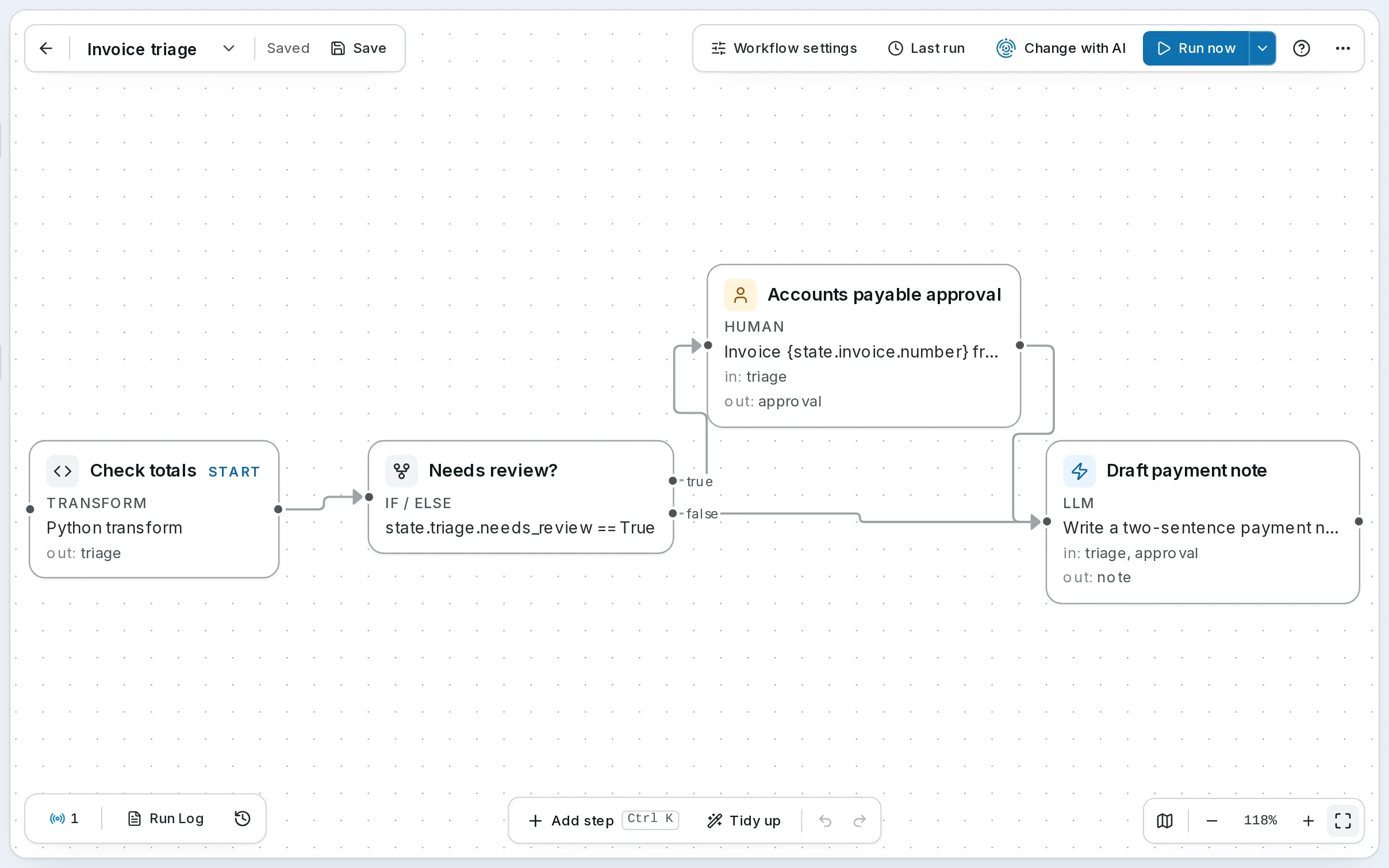
Side by side
SynapseOrch and OpenAI Agent Builder
| Compared | SynapseOrch | OpenAI Agent Builder |
|---|---|---|
| Status | Open source and maintained; nobody can switch it off, us included | Deprecated on June 3, 2026; shuts down on November 30, 2026 |
| Building a workflow | Describe it in plain words and approve the plan, or draw it | Draw it from nodes: Agent, If/else, While, Human approval, Guardrails, File search, MCP, Transform, Set state |
| Your existing workflows | Paste the Agents SDK export into Build with AI: it drafts the workflow with each agent’s instructions, and lists what didn’t carry over | Code → Agents SDK gives Python or TypeScript to run yourself; in OpenAI’s words it “does not convert your workflow graph” |
| Models | Ours with no API key, or your own keys for 23+ providers, OpenAI’s included; a different one per step | OpenAI’s models |
| A person signs off | A step anywhere; the run waits for days at no cost, answered in the app, by email or in Telegram | A Human approval node; in the exported code it is a function left for you to write |
| Guardrails | A check step a model runs before what it guards, with a reply when it blocks | A Guardrails node: PII, jailbreak, moderation and hallucination checks |
| Answers from your documents | Knowledge bases that cite the passage they used, and a test on your own files | File search over a vector store in the OpenAI platform |
| A chat on your website | A chat widget, one script tag, from Solo up | ChatKit stays; the Agent Builder workflow behind it goes, so it needs a server you run |
| Every run scored (evals) | A rubric and a judge model score every run; you hear when a score falls, and a fixed set re-runs after each change | Evals became read-only on October 31 and shut down with Agent Builder on November 30 |
| MCP, both ways | Both: run your workflows from Claude, ChatGPT or Cursor, and give agents a remote MCP server’s tools (local ones too when you self-host) | Its agents use MCP servers and OpenAI connectors |
| Where it runs after November 30 | SynapseOrch Cloud, or your own servers | Your own code and servers (Agents SDK), or a ChatGPT Business, Enterprise or Edu workspace (Workspace Agents) |
| What you pay for | A plan from $19/month, or Free; credits by step, and runs pause at the plan’s limit | OpenAI API prices for the models and tools each run uses, such as $2.50 per 1,000 file searches |
| Open source | Yes, AGPL-3.0; run it on your own servers | No; the Agents SDK it exports to is open source |
| Apps | 50+ by signing in, plus any API or MCP server | MCP servers and OpenAI connectors |
- Status
- SynapseOrch: Open source and maintained; nobody can switch it off, us included
- OpenAI Agent Builder: Deprecated on June 3, 2026; shuts down on November 30, 2026
- Building a workflow
- SynapseOrch: Describe it in plain words and approve the plan, or draw it
- OpenAI Agent Builder: Draw it from nodes: Agent, If/else, While, Human approval, Guardrails, File search, MCP, Transform, Set state
- Your existing workflows
- SynapseOrch: Paste the Agents SDK export into Build with AI: it drafts the workflow with each agent’s instructions, and lists what didn’t carry over
- OpenAI Agent Builder: Code → Agents SDK gives Python or TypeScript to run yourself; in OpenAI’s words it “does not convert your workflow graph”
- Models
- SynapseOrch: Ours with no API key, or your own keys for 23+ providers, OpenAI’s included; a different one per step
- OpenAI Agent Builder: OpenAI’s models
- A person signs off
- SynapseOrch: A step anywhere; the run waits for days at no cost, answered in the app, by email or in Telegram
- OpenAI Agent Builder: A Human approval node; in the exported code it is a function left for you to write
- Guardrails
- SynapseOrch: A check step a model runs before what it guards, with a reply when it blocks
- OpenAI Agent Builder: A Guardrails node: PII, jailbreak, moderation and hallucination checks
- Answers from your documents
- SynapseOrch: Knowledge bases that cite the passage they used, and a test on your own files
- OpenAI Agent Builder: File search over a vector store in the OpenAI platform
- A chat on your website
- SynapseOrch: A chat widget, one script tag, from Solo up
- OpenAI Agent Builder: ChatKit stays; the Agent Builder workflow behind it goes, so it needs a server you run
- Every run scored (evals)
- SynapseOrch: A rubric and a judge model score every run; you hear when a score falls, and a fixed set re-runs after each change
- OpenAI Agent Builder: Evals became read-only on October 31 and shut down with Agent Builder on November 30
- MCP, both ways
- SynapseOrch: Both: run your workflows from Claude, ChatGPT or Cursor, and give agents a remote MCP server’s tools (local ones too when you self-host)
- OpenAI Agent Builder: Its agents use MCP servers and OpenAI connectors
- Where it runs after November 30
- SynapseOrch: SynapseOrch Cloud, or your own servers
- OpenAI Agent Builder: Your own code and servers (Agents SDK), or a ChatGPT Business, Enterprise or Edu workspace (Workspace Agents)
- What you pay for
- SynapseOrch: A plan from $19/month, or Free; credits by step, and runs pause at the plan’s limit
- OpenAI Agent Builder: OpenAI API prices for the models and tools each run uses, such as $2.50 per 1,000 file searches
- Open source
- SynapseOrch: Yes, AGPL-3.0; run it on your own servers
- OpenAI Agent Builder: No; the Agents SDK it exports to is open source
- Apps
- SynapseOrch: 50+ by signing in, plus any API or MCP server
- OpenAI Agent Builder: MCP servers and OpenAI connectors
What this page says about OpenAI Agent Builder is from OpenAI’s own pages, checked on November 12, 2026: OpenAI deprecations · OpenAI: Agent Builder · OpenAI: Migrate from Agent Builder · OpenAI: node reference · OpenAI: ChatKit · OpenAI API pricing. Products change; tell us if something here is out of date.
Honestly
Which one is right for you?
Choose OpenAI’s own path if
- You write code and want to own every line: the Agents SDK export is a fair place to start.
- Your team already works in ChatGPT Business, Enterprise or Edu, and a Workspace Agent covers the job.
- You rely on OpenAI-only tools: Code Interpreter, image generation, or its guardrail checks that mask personal data.
- You need SOC 2 reports or EU data residency today.
Choose SynapseOrch if
- You want a workflow you and your client can read and approve, not code to maintain and host.
- A person has to sign off before anything goes out, and the run should wait for them.
- You want to choose the model per step: GPT with your own key, Claude, Gemini, a local model, or ours with no key.
- You build for clients: each client can have its own workspace with its own hard limit, and the people who only approve need no paid seat.
- You want an engine nobody can take away: it is open source.
Where it’s different
Three things OpenAI Agent Builder users notice
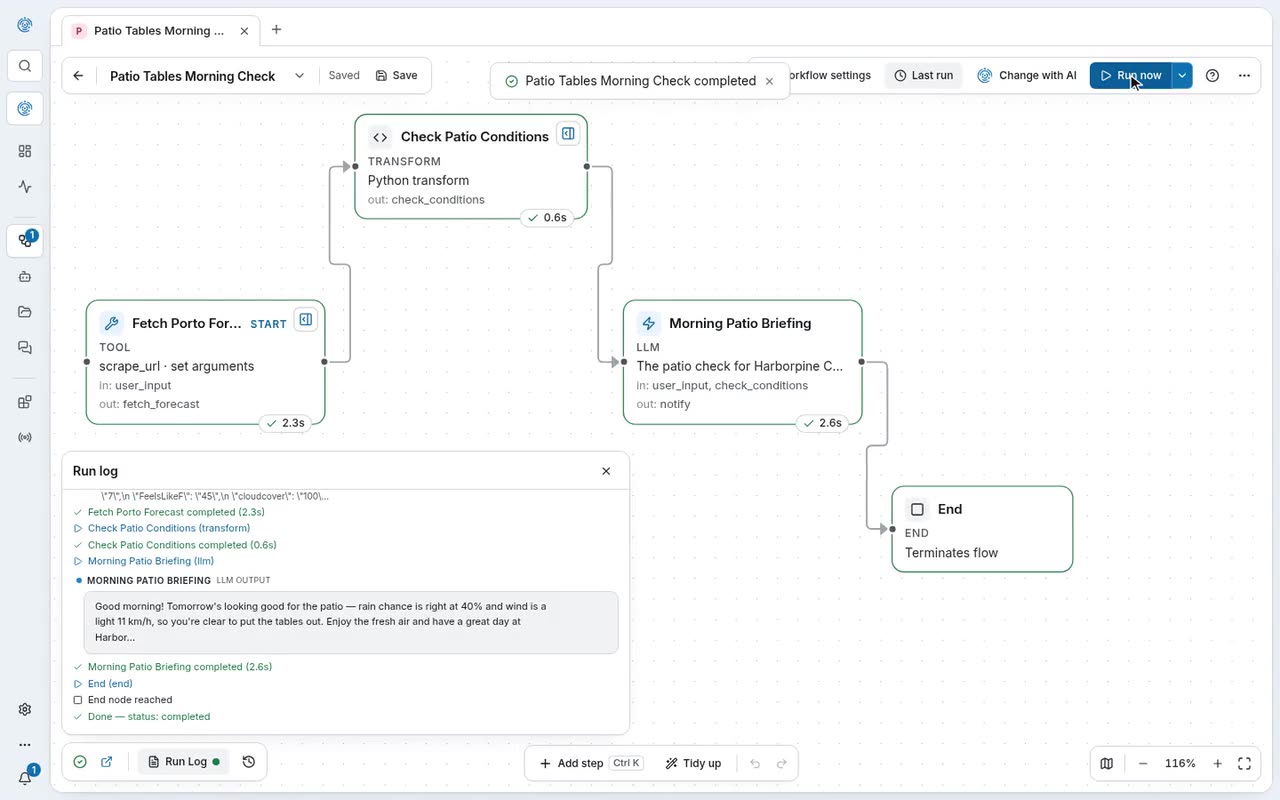
Paste the export, approve the plan
Build with AI reads the Agents SDK code: agents keep their instructions, a classifier becomes one routing step, and a “Not carried over” list says what to set up. Nothing is built until you approve.
See it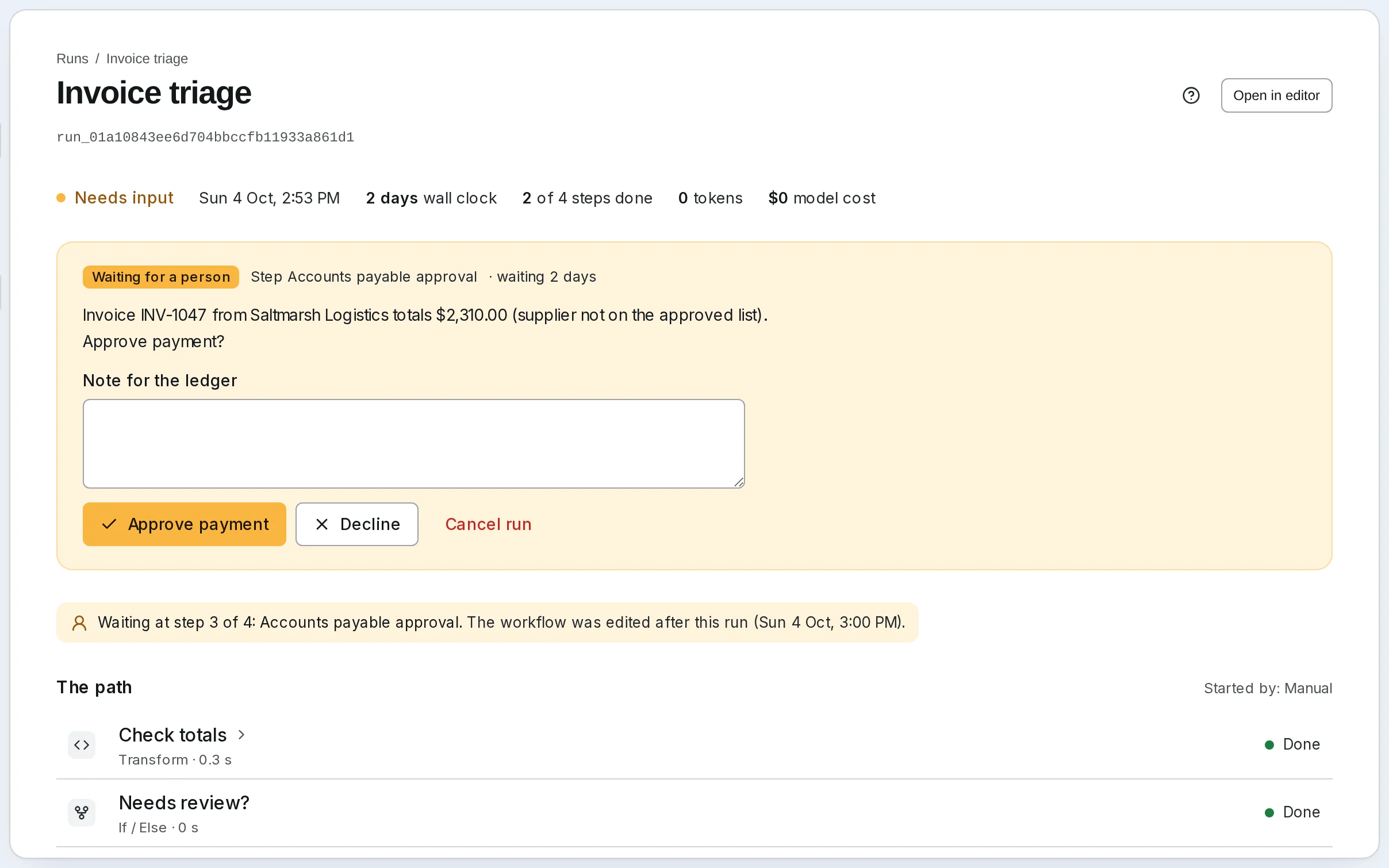
A sign-off that really waits
In the exported code, user approval is a function left for you to write. Here it is a step: the run waits, for minutes or days, until someone answers in the app, by email or in Telegram.
See it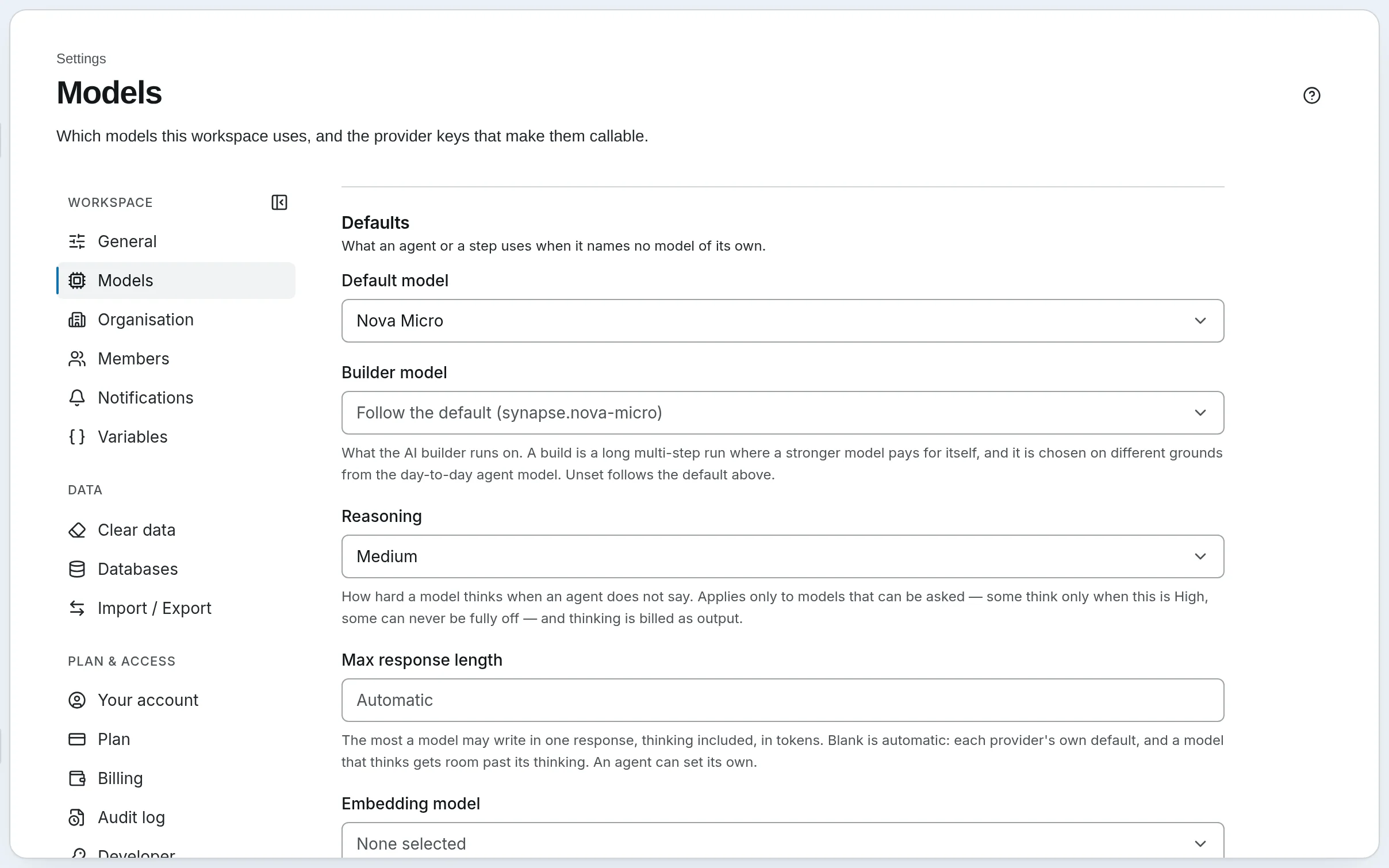
Any model, step by step
Keep GPT with your own OpenAI key, or use any of 23+ providers, or ours with no key at all. A small model can sort and a strong one can write.
See it
Questions
Coming from OpenAI Agent Builder?
- When does OpenAI Agent Builder shut down?
- OpenAI announced the deprecation on June 3, 2026, and Agent Builder is scheduled to shut down on November 30, 2026, along with the Evals platform and reusable prompts. ChatKit stays. OpenAI points users to the Agents SDK, which is code, or to ChatGPT Workspace Agents, which need a ChatGPT Business, Enterprise or Edu workspace.
- How do I export my Agent Builder workflows?
- Open each workflow in Agent Builder, choose Code in the top bar, then Agents SDK, then Python or TypeScript, and copy the whole export. Do it for every workflow before November 30. OpenAI says the export doesn’t convert your workflow graph, so also note which apps, MCP servers and vector stores each one used, and keep copies of the files you uploaded.
- Can SynapseOrch import the export?
- It reads it. Paste the Python or TypeScript into Build with AI: it drafts a workflow with each agent’s instructions, a classifier as one routing step and guardrails as a check, and lists what didn’t carry over. Nothing is built until you approve the plan. Classifiers, guardrails and fixed chains usually come out right the first time. Approvals, loops and function tools often need a fix in the plan, and very long instructions can come out shortened, so check them before you approve.
- What doesn’t carry over?
- Function tools, because code is never copied or run: each comes back as an HTTP, MCP or Python tool. Your vector store’s files: upload them to a knowledge base. MCP sign-ins: connect each server again, and rotate any key that was written into the export, since we take it out before anything reads it. Code Interpreter, image generation and ChatKit: our chat widget replaces ChatKit on paid plans.
- Can I keep using GPT models?
- Yes. Add your OpenAI key in Settings → Models and choose a GPT model for the workspace or for a single step. Or use our models with no key, or any other provider.
- Will you move it for me?
- Yes. Send us the export, or a screenshot of the canvas, and we’ll rebuild it with you, free, as a workflow you can read and approve. The free rebuild is part of our pilot, open to the first 10 businesses. If you build for clients, ask about the founding-partner offer on our switching page.
- Do I need to be an engineer?
- No. Describe the job to Synapse AI in plain words: it asks about what you didn’t say, shows a plan you can read, and builds nothing until you approve. You can also draw the workflow yourself.
- Which AI models can I use?
- Our models, with no API key, on every Cloud plan, or your own keys for 23+ providers. Each step names its own model, so a small one can sort and a strong one can judge.
- What happens when I reach my plan’s limit?
- Runs pause. Your plan is never billed past its limit.
- Can I run it on my own servers?
- Yes. SynapseOrch is open source under AGPL-3.0, and the engine that runs your workflows on Cloud is the same one you install yourself.
- Is my data used to train models?
- No, not by us. Our models run on Amazon Bedrock, whose terms prohibit training on your prompts or outputs. With your own key, that provider’s terms apply.
Move it before November 30.
Export each workflow now, while Agent Builder still opens. Paste one into Build with AI and approve the plan, or send it to us and we’ll rebuild it with you, free.
Free plan, no card needed.