Features · Build with AI
Describe the job.Approve the plan.
Synapse AI, the assistant inside SynapseOrch, turns a job told in plain words into a workflow. It asks what you didn’t say, shows you a plan you can read, and builds nothing until you approve it.
Free plan, no card needed.
A morning weather check for a café’s patio, built and run in a demo workspace. Played without sound.
Step by step
From a sentence to a running workflow.
Step 1 of 5
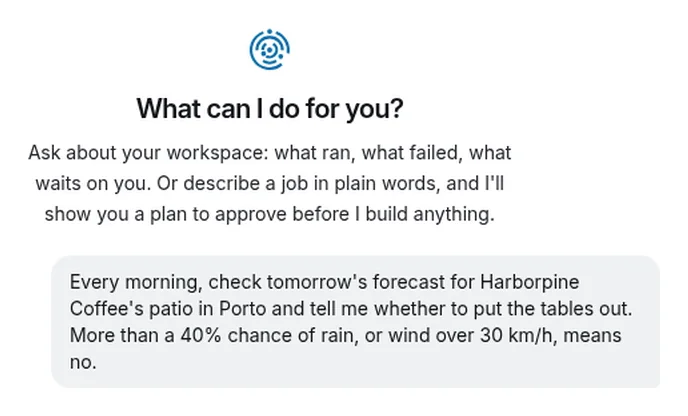
You describe the job
In plain words, the way you would tell a colleague: what starts it, what it does, where the result goes, and what it should check with you first. Name the site, the API or the app if you know it.Step 2 of 5
It asks what you didn’t say
Before it plans, it reads the sites and APIs you named and looks up what it needs to know. What only you can answer, it asks in one form: here, the forecast address it would use.- Reads up to three sites or APIs your message names
- Answers questions about SynapseOrch from its own docs
- Asks what only you know, in one form
Step 3 of 5
You read the plan
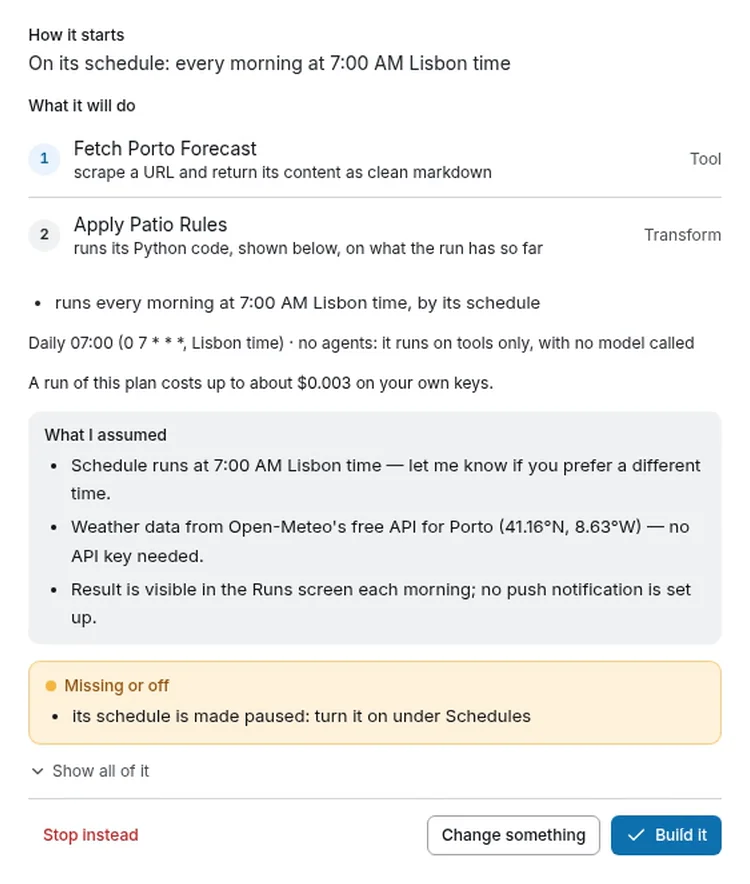
Nothing is built yet. The plan says what will happen, in words you can check:- How it starts. What starts each run: here, its schedule, every morning at 7:00 Lisbon time.
- What it will do. One numbered row per step, said in plain words.
- Who does each step. A tool, logic or a model, and a person where you sign off. Logic calls no model.
- What a run costs. Said before anything runs. This plan calls no model, and a run costs up to about $0.003.
- What it assumed. What it filled in that you didn’t say, so you can correct it before it builds.
- Missing or off. Anything it can’t do yet, said before you approve. Here: the schedule starts paused.
- Your answer. Build it, Change something (it redrafts from what you type), or Stop instead.
Step 4 of 5
You approve. It builds.
Press Build it, and it makes the agents and tools the plan needs, saves the workflow and checks it. Then it takes you to what it built, or leaves you the way there if you have moved on.- A key goes on a Connect card, never into the chat
- A schedule starts paused, so the first run is yours to check
- A workflow that never passes its check is removed again, with the reason
Step 5 of 5
It runs the way you approved
Every run follows the saved workflow, and its page says so: the result, the path it took, and how long each step took and what it cost. This one called no model, as its plan said: 0 tokens, $0 model cost.
Step 1 of 5
You describe the job
In plain words, the way you would tell a colleague: what starts it, what it does, where the result goes, and what it should check with you first. Name the site, the API or the app if you know it.Step 2 of 5
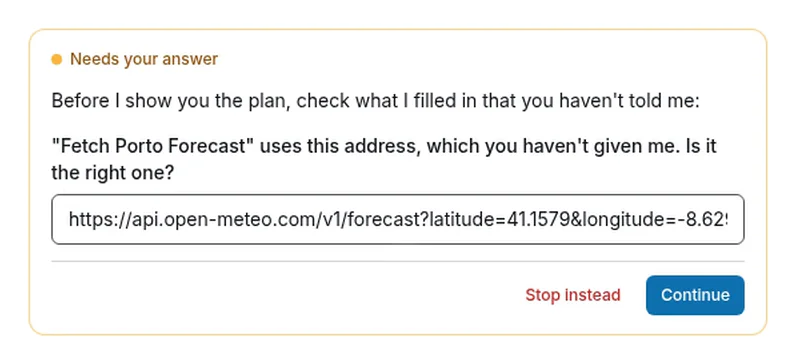
It asks what you didn’t say
Before it plans, it reads the sites and APIs you named and looks up what it needs to know. What only you can answer, it asks in one form: here, the forecast address it would use.- Reads up to three sites or APIs your message names
- Answers questions about SynapseOrch from its own docs
- Asks what only you know, in one form
Step 3 of 5
You read the plan
Nothing is built yet. The plan says what will happen, in words you can check:- How it starts. What starts each run: here, its schedule, every morning at 7:00 Lisbon time.
- What it will do. One numbered row per step, said in plain words.
- Who does each step. A tool, logic or a model, and a person where you sign off. Logic calls no model.
- What a run costs. Said before anything runs. This plan calls no model, and a run costs up to about $0.003.
- What it assumed. What it filled in that you didn’t say, so you can correct it before it builds.
- Missing or off. Anything it can’t do yet, said before you approve. Here: the schedule starts paused.
- Your answer. Build it, Change something (it redrafts from what you type), or Stop instead.
Step 4 of 5
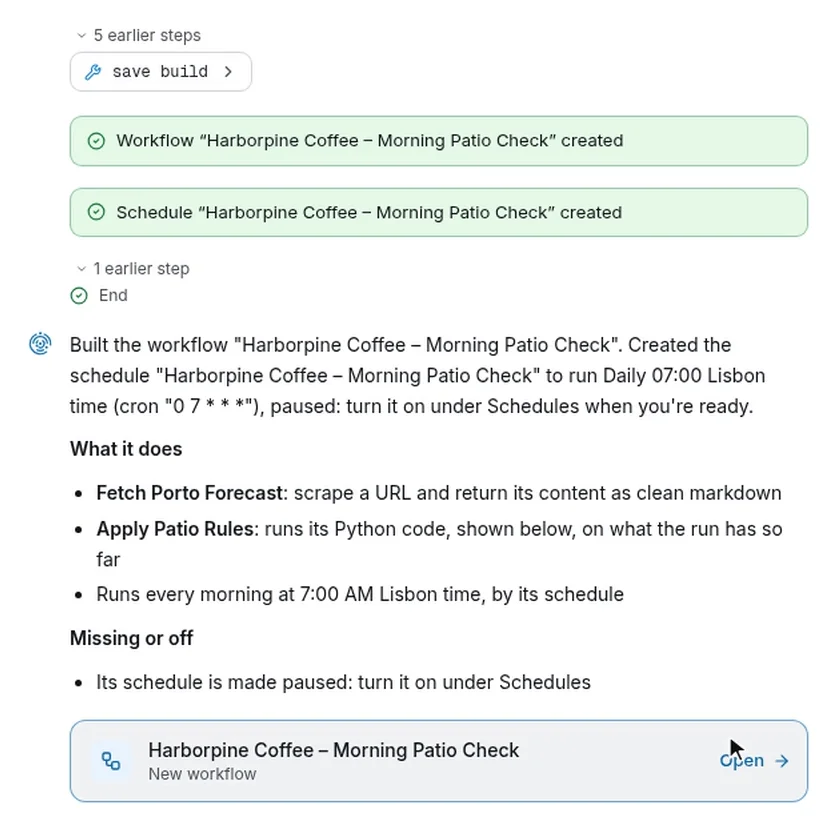
You approve. It builds.
Press Build it, and it makes the agents and tools the plan needs, saves the workflow and checks it. Then it takes you to what it built, or leaves you the way there if you have moved on.- A key goes on a Connect card, never into the chat
- A schedule starts paused, so the first run is yours to check
- A workflow that never passes its check is removed again, with the reason
Step 5 of 5
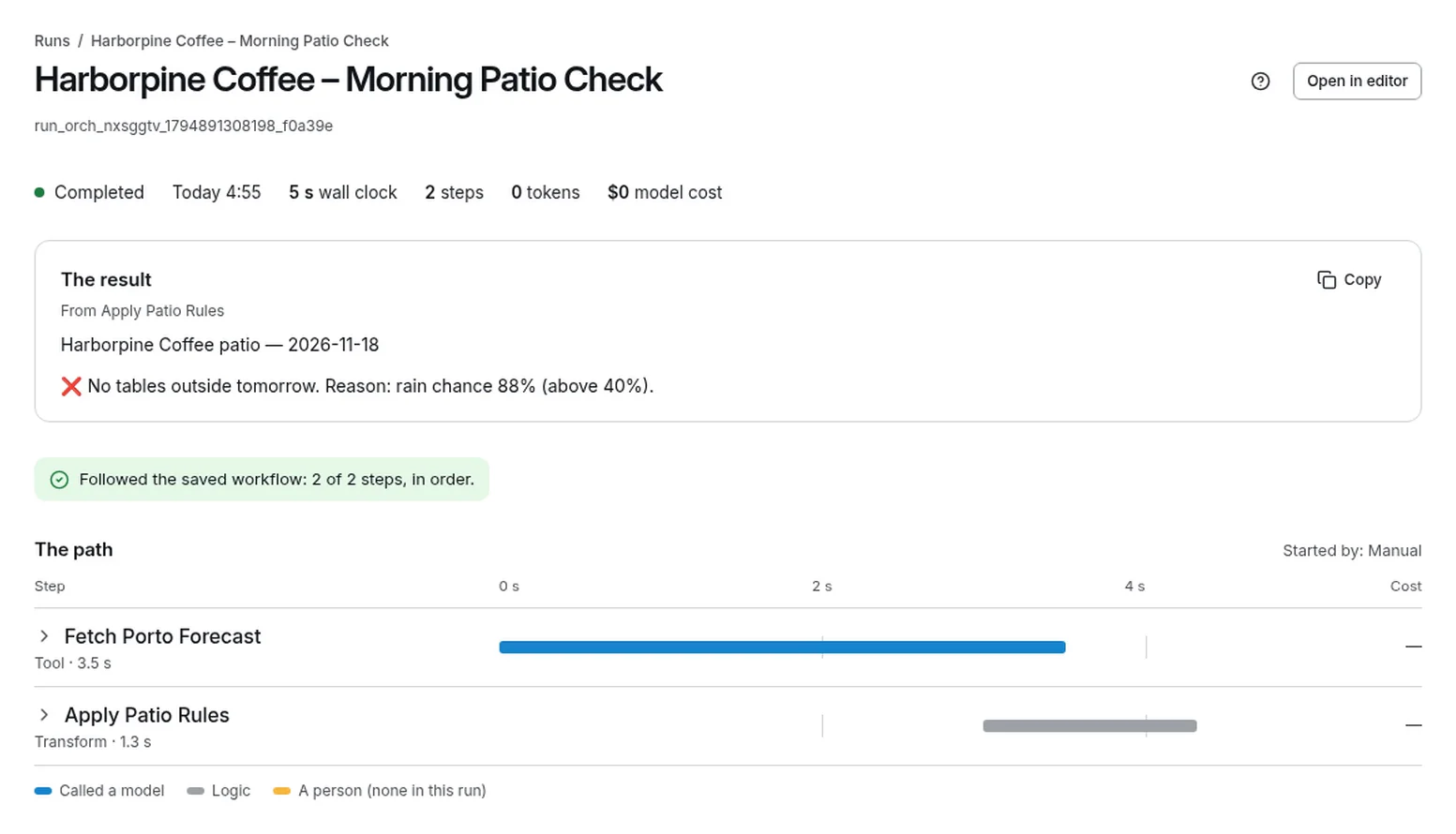
It runs the way you approved
Every run follows the saved workflow, and its page says so: the result, the path it took, and how long each step took and what it cost. This one called no model, as its plan said: 0 tokens, $0 model cost.
Other ways in
Start from what you already have.
An API’s spec, a tool that needs fixing, or code from another tool. Each goes the same way: you see the change before it is made.
From an API
Give it the spec. It makes the tools.
Paste a spec, a docs link, the API’s address or a curl. It makes a tool for each call the job needs, and an agent that uses them. Here it builds an exchange-rate agent from a public API and asks it a question.
Fix what you have
Say what’s wrong. See the diff.
Say what’s wrong with a Python tool. It shows the fix as a diff, with what its test printed, and changes nothing until you press Go ahead. A change to a workflow or an agent is shown field by field, before and after.
Leaving OpenAI Agent Builder? Paste its Agents SDK export, in Python or TypeScript. The code is read, never run, and each agent’s instructions come across word for word; any key written in the code is taken out first. How switching works
Your rules
What it never does without you.
- It builds nothing until you approve the plan
- Change something as often as you like. Stop instead leaves your workspace as it was.
- It shows a change before it makes one
- Ask it to change what exists and it answers with the change, each field before and after. Only Go ahead makes it.
- It never takes a key in the chat
- Keys go on Connect cards, to the screens that keep them. A key pasted anyway is taken out before anything reads it.
- It starts schedules paused
- You check what a run starts with, then turn it on, or ask it to.
- It can undo its last change
- Undo is a change of its own, shown to you and approved like any other.
- It works within your role
- On Cloud a viewer can ask and read; building and changing take the builder role. Its changes are in the audit log.
Nothing hidden
It is built the way you build.
Synapse AI is an ordinary SynapseOrch workflow, with ordinary sub-agents. See how I’m built, in its panel, opens that workflow on a read-only canvas: where it starts, where it stops for you, and the steps in between. Every step type in it is one you can use on your own canvas.
When you run SynapseOrch yourself, Duplicate to my workspace copies it into your workflows to read or change.
Models and cost
What it runs on, and what it costs.
- On SynapseOrch Cloud
- It builds on Claude Sonnet 4.6 unless your workspace picks its own builder model, paid from your model wallet while it holds money, then on your default model. Every plan includes $2 of models a month, no API key needed. Its chat uses credits, like a run.
- On your own servers
- It is a new install’s default agent, on the builder model you choose in Settings. Use Claude Haiku 4.5 or a stronger model; reasoning models do noticeably better.
- What a build makes
- Ordinary workflows, agents and tools: you can open, change, export or delete each one like anything you made by hand.
Describe the job your team repeats.
Let us run it, with nothing to install and no API key needed. Or run it on your own servers, free and open source.
Free plan, no card needed.