Features · Costs and limits
See what every step costs,and never get billed past your plan.
Every run shows what each step cost and which AI model it used, and every workflow tells you what a run should cost before it starts. When your plan’s monthly credits run out, runs stop. You’re never billed past your plan.
Free plan, no card needed.
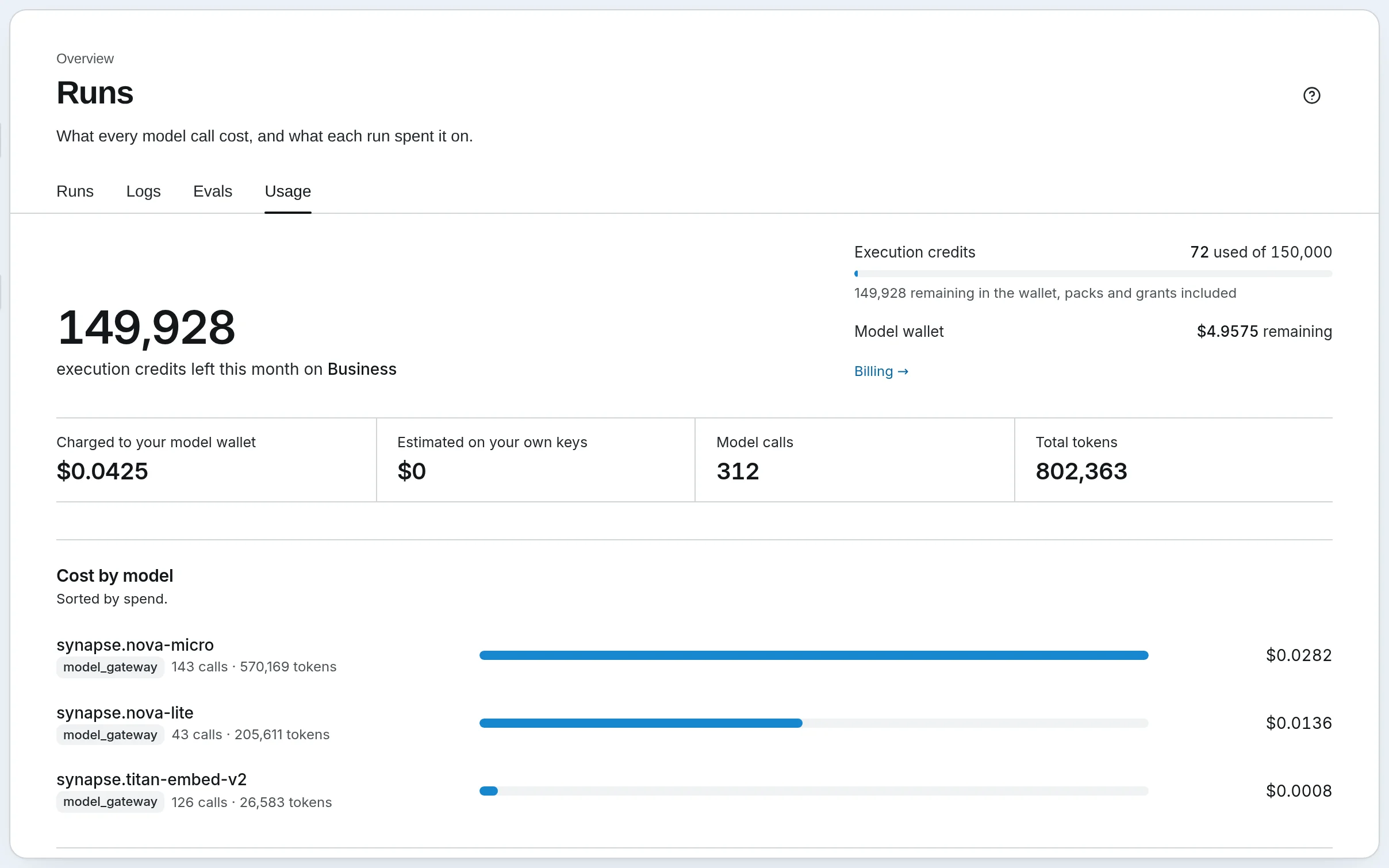
The Usage page in a demo workspace: credits left this month, AI model spend, calls and tokens, and cost by model.
Step by step
Where the money goes, run by run.
Step 1 of 6
Know the cost before it runs
Every workflow says what a run should cost before you start it: the credits, and the AI spend from your model wallet, from its cheapest path to its most expensive.- On Run now and in the workflow’s settings
Step 2 of 6
Every run shows its cost
The Runs page lists every run with the steps it took, how long it ran, the tokens it used and what it cost, newest first.- The Usage page adds it all up by model and by day, with the credits left this month
Step 3 of 6
Every step shows its cost
Open a run to see each step’s AI model and cost. Use a small, cheap model where a step only sorts or checks, and a strong one where judgment matters.- A step that does work costs 1 credit, whichever model it uses
- Branches and other logic or data steps cost 0.1 credit
- Waiting for a person’s approval costs nothing, however long it takes
Step 4 of 6
Many steps need no AI
Branches and Python steps (Team plan and up on Cloud) make decisions without an AI model, so you only pay for AI where it’s actually needed.Step 5 of 6
It stops at your cap
Give a workflow a cap per run, in credits or in AI dollars on Cloud. The run stops before the step that would go over it and says so, with a button to raise the cap.- A step that’s already working finishes first
Step 6 of 6
Credits plus AI spend
Credits pay for running workflows. AI models are paid separately, from your model wallet, or by your provider if you use your own keys. Every plan includes $2 a month of AI models from us.- Warnings when 50%, 25% and 10% of the month’s credits are left
- Buy more credits on a paid plan, or move up a plan
- With your own keys, we charge nothing for AI models
Step 1 of 6
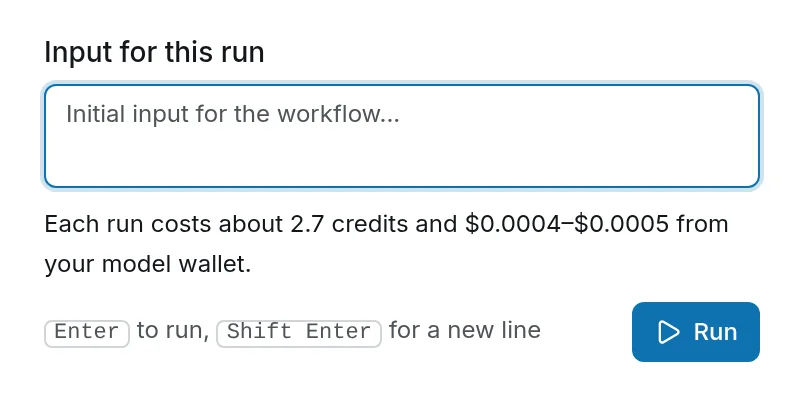
Know the cost before it runs
Every workflow says what a run should cost before you start it: the credits, and the AI spend from your model wallet, from its cheapest path to its most expensive.- On Run now and in the workflow’s settings
Step 2 of 6
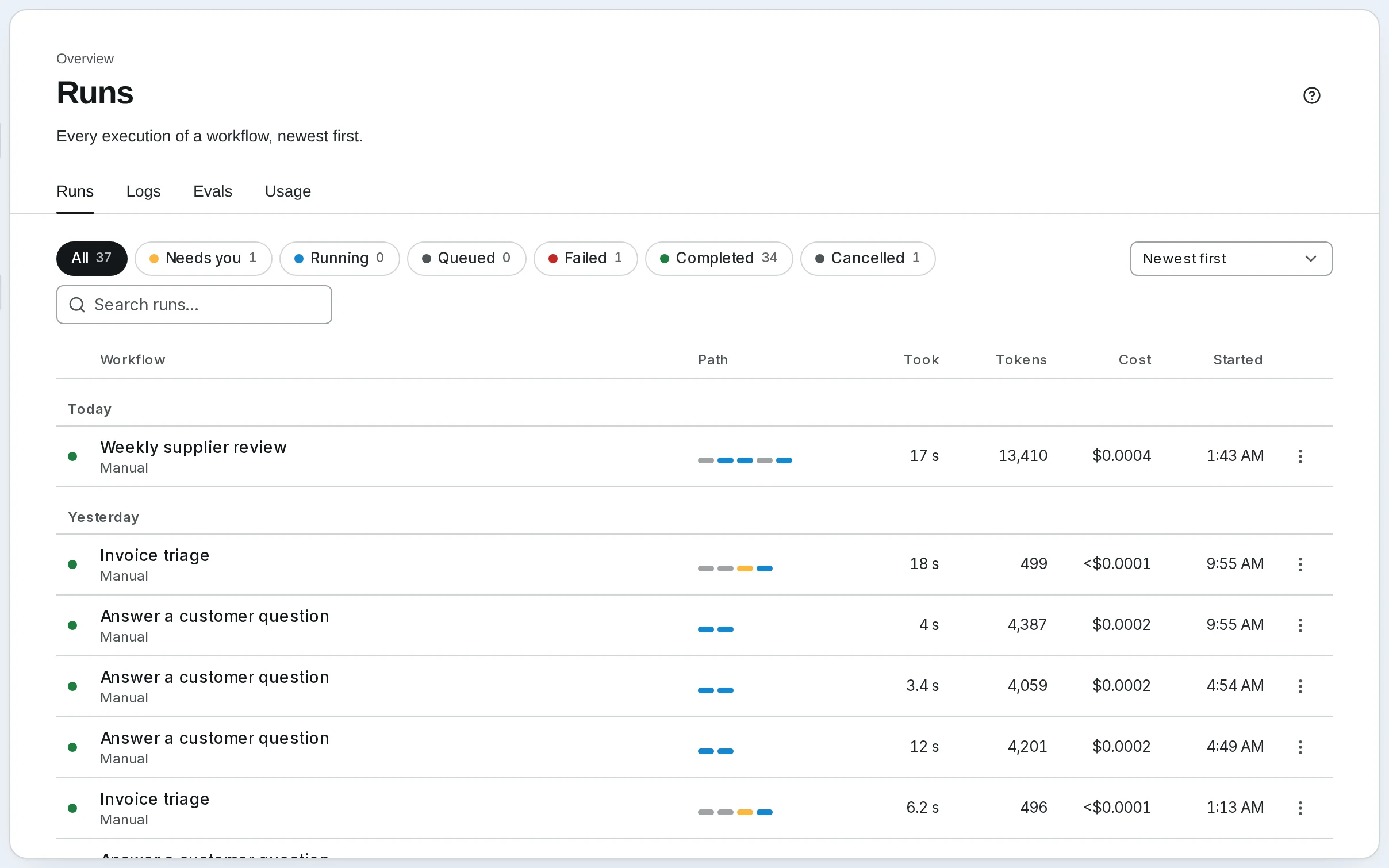
Every run shows its cost
The Runs page lists every run with the steps it took, how long it ran, the tokens it used and what it cost, newest first.- The Usage page adds it all up by model and by day, with the credits left this month
Step 3 of 6
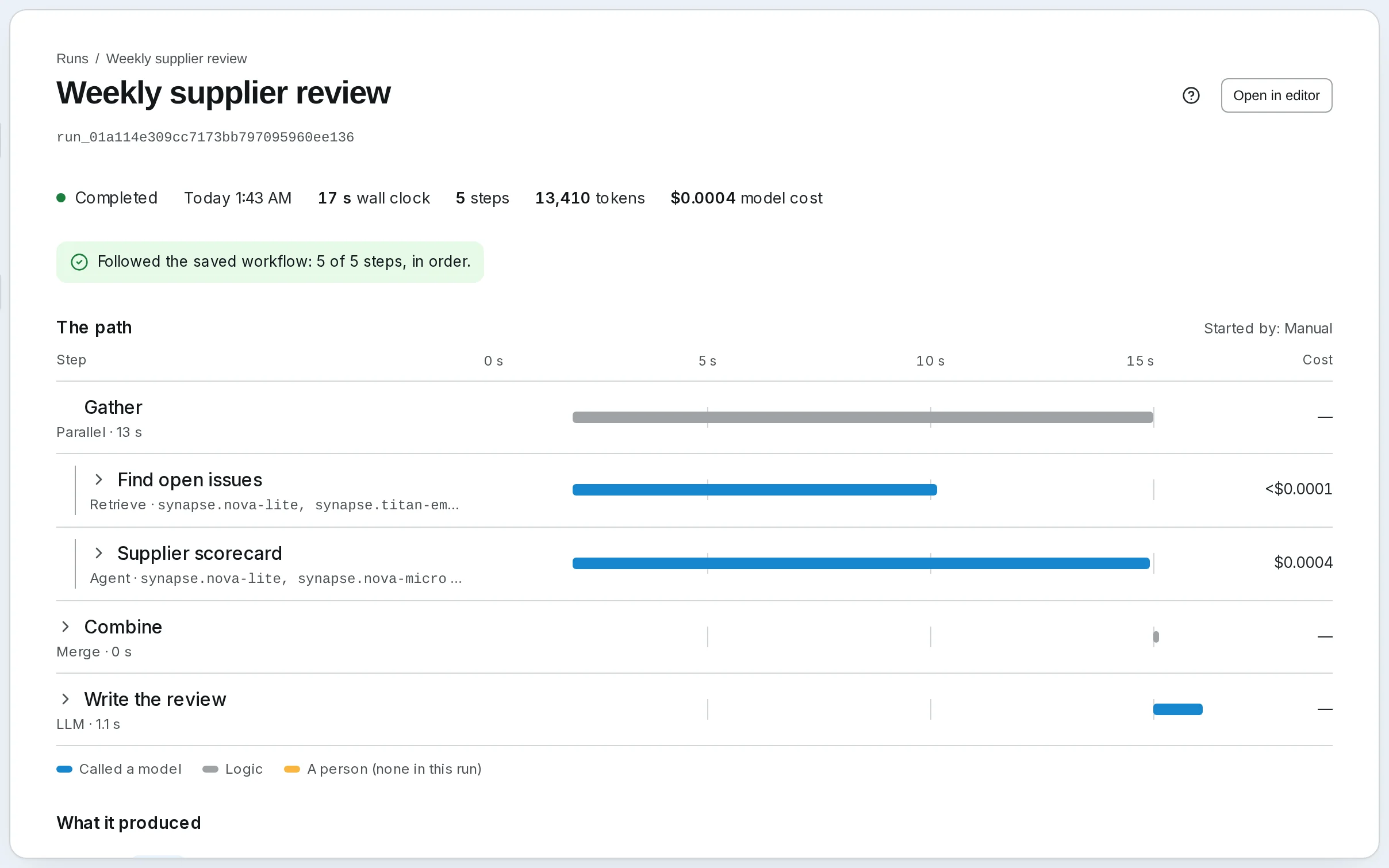
Every step shows its cost
Open a run to see each step’s AI model and cost. Use a small, cheap model where a step only sorts or checks, and a strong one where judgment matters.- A step that does work costs 1 credit, whichever model it uses
- Branches and other logic or data steps cost 0.1 credit
- Waiting for a person’s approval costs nothing, however long it takes
Step 4 of 6
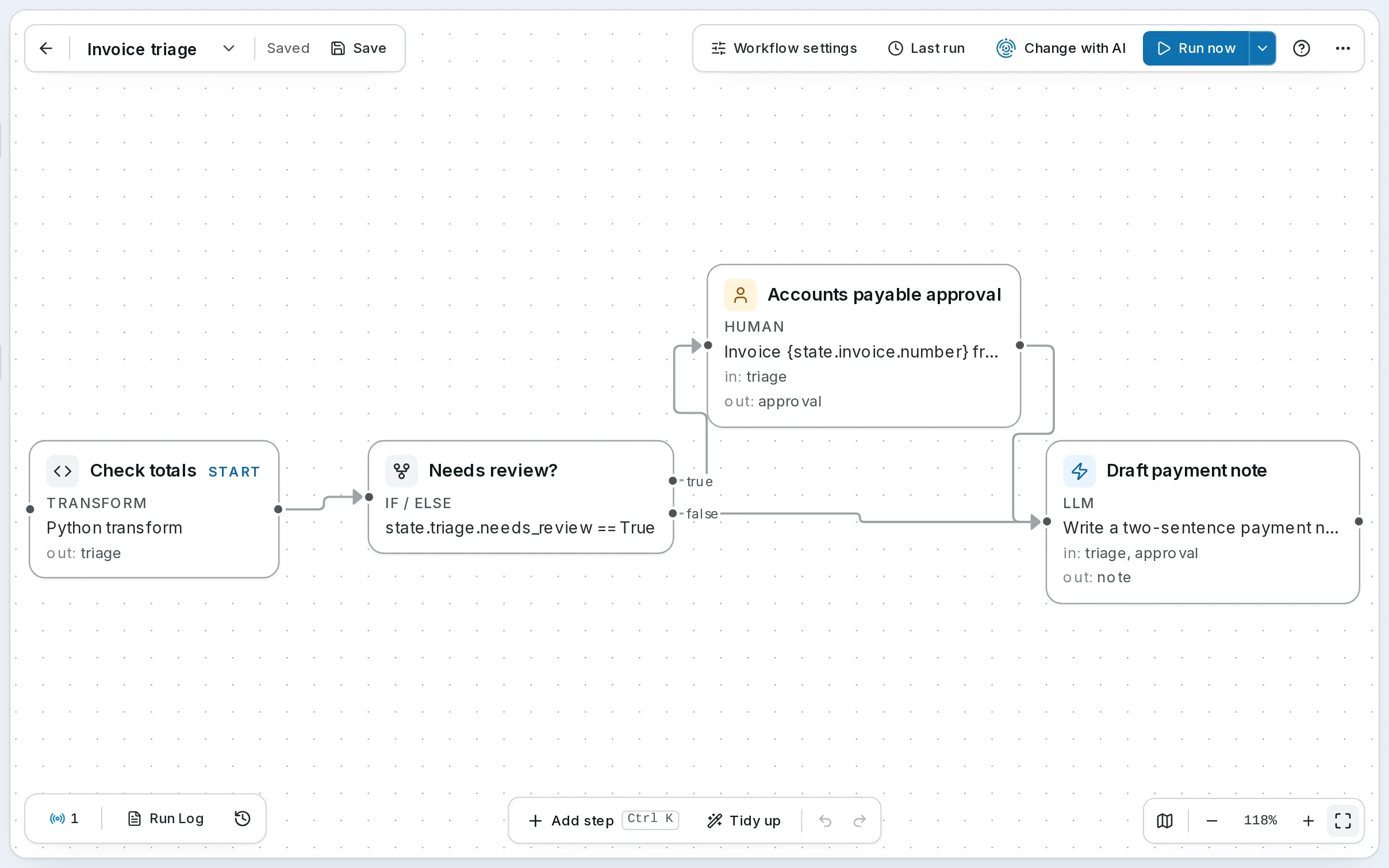
Many steps need no AI
Branches and Python steps (Team plan and up on Cloud) make decisions without an AI model, so you only pay for AI where it’s actually needed.Step 5 of 6
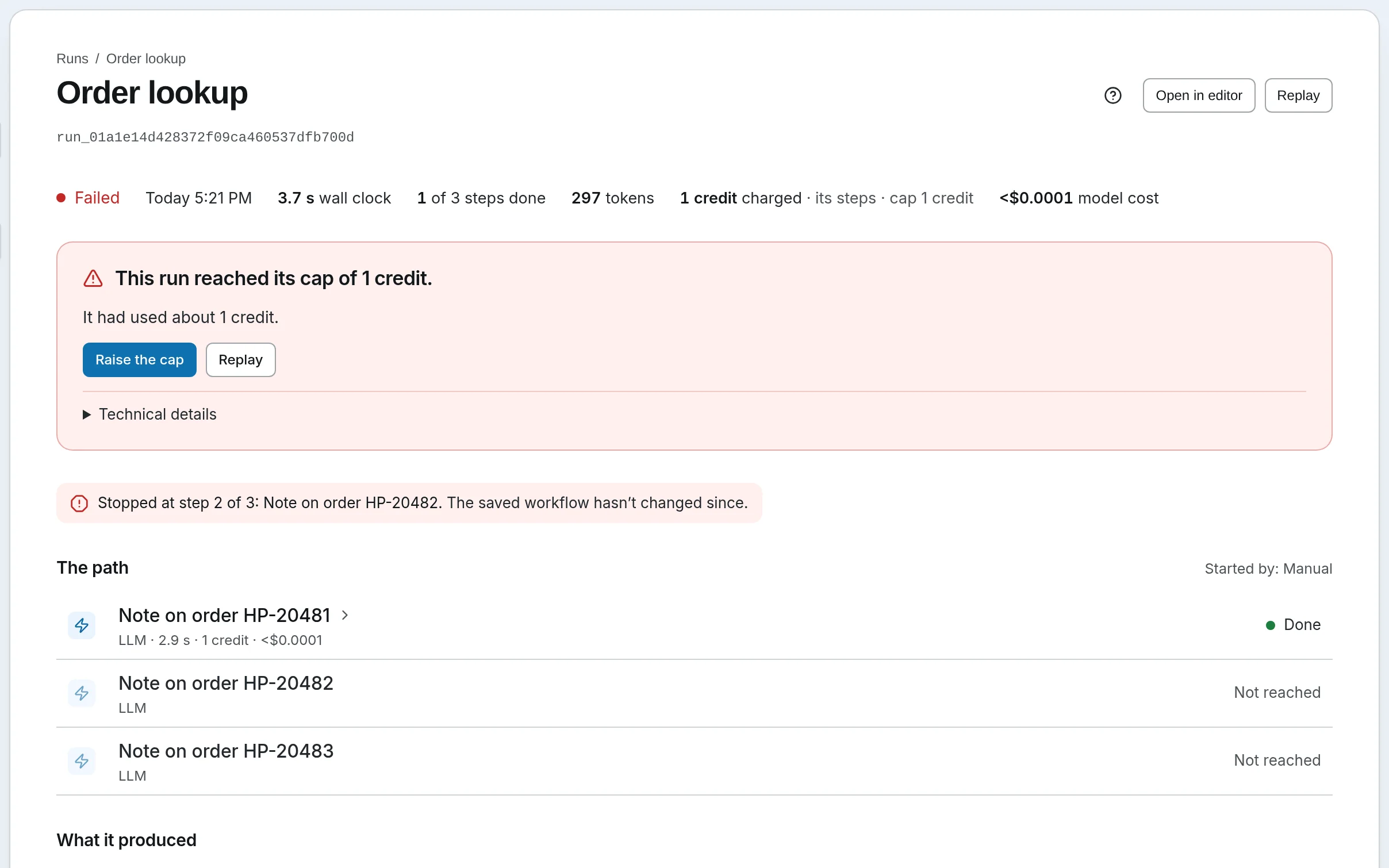
It stops at your cap
Give a workflow a cap per run, in credits or in AI dollars on Cloud. The run stops before the step that would go over it and says so, with a button to raise the cap.- A step that’s already working finishes first
Step 6 of 6
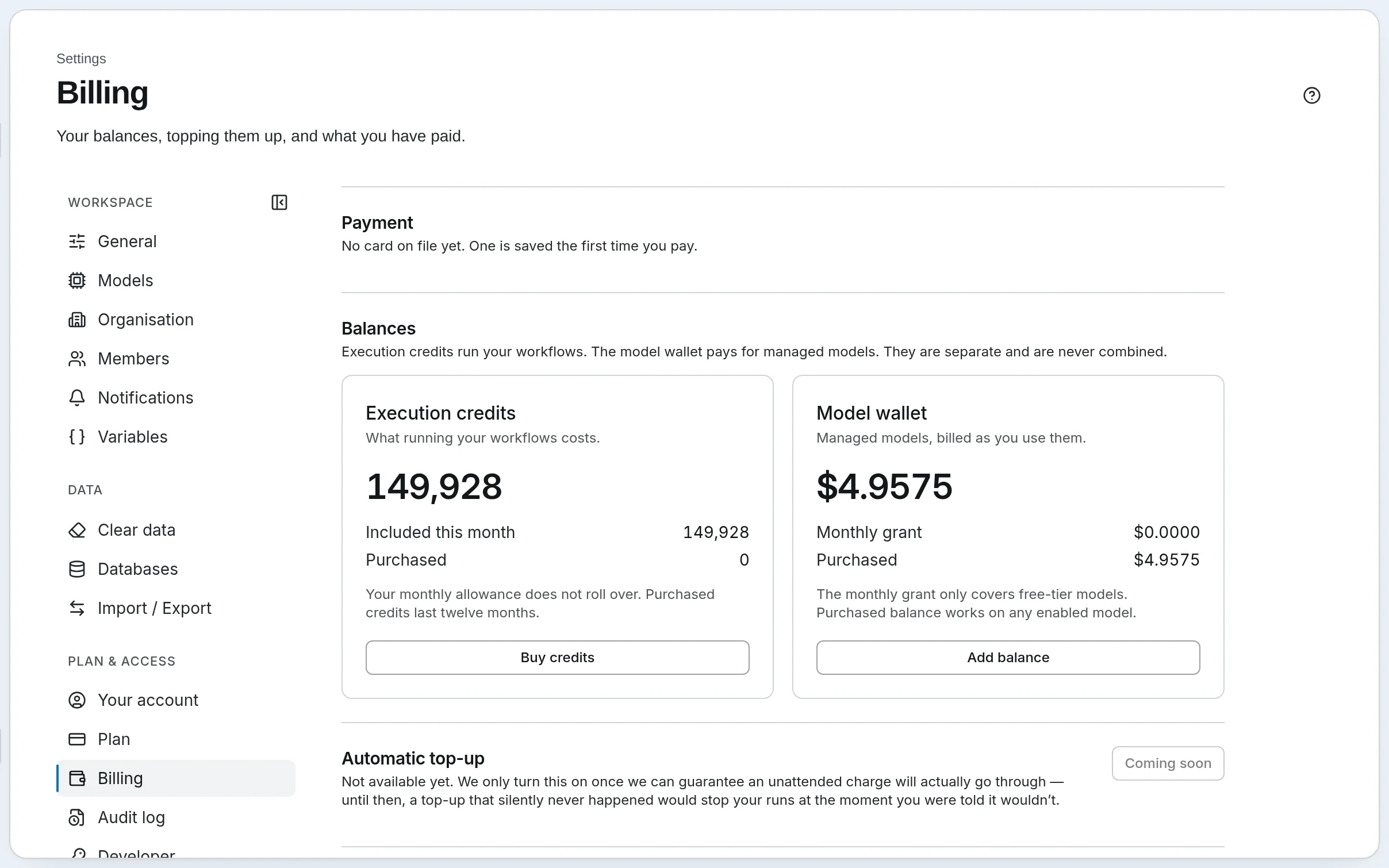
Credits plus AI spend
Credits pay for running workflows. AI models are paid separately, from your model wallet, or by your provider if you use your own keys. Every plan includes $2 a month of AI models from us.- Warnings when 50%, 25% and 10% of the month’s credits are left
- Buy more credits on a paid plan, or move up a plan
- With your own keys, we charge nothing for AI models
What it’s for
What builders do with these numbers.
- Price a job before you quote it
- The estimate shows what a run will cost, from its cheapest path to its most expensive, before it ever runs.
- Find the step that costs the most
- Every run shows each step’s model and cost, so you know which step to move to a cheaper model.
- Cap what a client’s workflow can spend
- Set a cap per run, in credits or in AI dollars on Cloud. The run stops before the step that would go over it.
- Use your own API keys
- Bring your own AI provider key, and your provider bills you for the models, with nothing extra from us.
A worked example
A weekly competitor check: $1.36 a month in AI costs, or $0.20.
The job: every Monday, read five competitors’ pricing and changelog pages, and write the team a note when something changed. Priced at list prices: Claude Sonnet 4.6 at $3 per million tokens read and $15 per million written, Claude Haiku 4.5 at $1 and $5.
- One agent does it all: $1.36 a month
- It reads all five pages in full every Monday and writes the note: about 103,500 tokens read and 2,000 written on Sonnet. $0.34 a run.
- A workflow does it: $0.20 a month
- Plain steps fetch the pages and keep only the parts that matter, with no AI model. Haiku checks whether anything changed, and Sonnet writes only when it did. $0.09 a run with a change, $0.016 without.
- About 6.7 times cheaper
- Same job, same note. Even in a month where every Monday has a change, the workflow costs $0.34, still four times less.
- Every sum, shown
- The token counts, the prices and each step’s share are in the post why a workflow costs less than asking an AI agent every time. On Cloud, the Python step it uses comes with the Team plan and up.
Your rules
What it never does to your bill.
- It never bills past your plan
- When the month’s credits are used up, runs stop until the next month. You’re never billed beyond the plan you chose.
- It checks between steps
- A run that’s already going may finish a small shortfall, up to 5% of the month’s credits. A bigger one stops before the step it can’t pay for, and says why.
- It tells you the cost first
- Each workflow shows what a run should cost, from its cheapest path to its most expensive, in its settings and on Run now.
- It stops at your cap
- Set a cap per run, in credits or AI dollars on Cloud. The run stops before the step that would go over it; a step already working finishes.
- Waiting is free
- A run waiting for a person, or queued for a free slot, costs nothing while it waits.
- Runaway runs stop
- Each plan has a longest run time. It’s a safety guard, not an allowance: a run past it ends and says why.
Plans
What a credit is, on every plan.
- A step
- An agent, an AI model call, an evaluator, a tool or a nested workflow costs 1 credit. A logic or data step costs 0.1. A person’s step costs nothing.
- A run
- Its steps added up, or one credit per started minute of active work if that’s more, and never less than one credit.
- On your own servers
- No credits at all: your AI providers bill you directly, and the estimate and a cap in AI dollars work the same way.
Know the bill before it arrives.
Let us run it, with nothing to install and no API key needed. Or run it on your own servers, free and open source.
Free plan, no card needed.